1
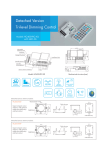
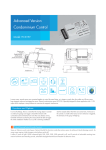
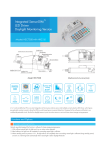
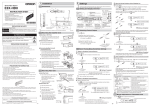
Advanced Version Tri-level Dimming Control Model: HC018V Antenna module LED indication 4.2 45 Detection area Hold-time Daylight threshold Stand-by period Stand-by diming level Daylight sensor Push 28 86.5 93.2 102 1-10V output %FUFDUJPO1BUUFSO -PPQJO 5. -PPQPVU "NCJFOUEBZMJHIU UISFTIPME IPVST NBOVBMPO )PMEUJNF T_NJO _-VY Function and Options 1 Tri-level Dimming Control (Corridor Function) Same as Tridonic excel control gear, Hytronik builds this function inside the motion sensor to achieve tri-level dimming control, for some areas that require a light change notice before switch-off. It offers 3 levels of light:100%-->dimmed light (10%, 20%,30%,50% optional)-->off; and 2 periods of selectable waiting time: motion hold-time and stand-by period; selectable daylight threshold and choice of detection area. With sufficient natural light, the light does not switch on when presence detected. With insufficient natural light, the sensor switches on the light automatically when person enters the room. People left, light dims to stand-by level (10% /20% /30% /50%, optional) after the hold-time. Light switches off automatically after the stand-by period elapsed. 2 8H Manual on Mode for LED Lamp Rapidly turn off/on the power supply three times within 3 seconds, the light will be 100% on for 8 hours, and then goes to sensor mode automatically after 8 hours. Useful when sensor function is not needed in special occasion. Note: this 8H manual on mode can be cancelled by turning off/on the power supply one time within 1second. 3 Ambient Daylight Threshold Switch the power supply to the sensor two times within 2 seconds, the sensor can set the ambient lux level as the new threshold. Both the settings on DIP switch and the ambient lux threshold learned can over write each other. This feature enables the daylight sensor to be commissioned to the environment in which it is installed. The latest action controls. (More details of the operation procedure please refer to user manual). 4 Zero-cross Relay Operation Designed in the software, sensor switches on/off the load right at the zero-cross point, to ensure the minimum current passing through the relay contact point, and protect the relay for long life. 5 Loop-in and Loop-out Terminal Double L N terminal makes it easy for wire loop-in and loop out, and saves the cost of terminal block and assembly time. 6 Manual Override This sensor reserves the access of manual override function for end-user to switch on/off, or adjust the brightness by push-switch, which makes the product more user-friendly and offers more options to fit for some extra-ordinary demands: * Short push (<1s): on/off function; On → off: the light turns off immediately and can not be lighten for a certain time (equals to hold-time preset) even movement is detected. After this period, the sensor goes to sensor mode. Off → on: the light turns on and goes to sensor mode, no matter if ambient Lux level exceeds the daylight threshold or not. * Long push (>1s): dim up/down the hold-time brightness between 10% and 100%. Both the settings on DIP switch and manual override can overwrite each other, the latest action controls. Note: if end-user do not want this manual override function, just leave the “push” terminal alone and don’t connect it to any wire. Wiring Diagram push HC018V LED Driver LED Driver Note: this 1-10V output is non-isolated, please make sure the fixture is constructed according to relevant safety standard. Max.800W 7 Absence Detection Function It is easy to forget to switch off the light, in office, corridor, even at home. And in many other cases, people do not want to have a sensor to automatically switch on the light, for example, when people just quickly pass-by, there is no need to have the light on. The solution is to apply this “absence detector”: motion sensor is employed, but only activated on the maunal press of the push switch, light keeps on in the presence, and dimmed down in the absence, and eventually switch off in the long absence. It is a good combination of sensor automation and maunal override control, to have the maximum energy saving, and at the same time, to keep efficient and comfortable lighting. Short push to activate the sensor and switch on the light Light does not switch on when presence detected. Light keeps on during the presence. With the manual short press on the push-switch, the sensor is activated and switches on the light. People left, light dims to 10%/20%/ 30%/50% (optional) stand-by level after the hold-time. Light switches off automatically after the stand-by period elapsed. Note: end-user can choose either 6 or 7 for the push function. ( software pre-defined in factory). Default function is manual override. Detection Pattern 10% 30% 50% 75% Wall mounting height Ceiling mounting height(m) 10% 30% 50% 75% Ceiling mounting pattern (m) Wall mounting pattern (m) Settings 1 1 2 Detection area Detection area can be reduced by selecting the combination on the DIP switches to fit precisely for each specific application. 2 Hold-time Hold-time means the time period you would like to keep the lamp on 100% after the person has left the detection area. 3 1 2 3 5s 30s 1min 5min 10min 20min 30min I Disable II 50Lux III IV 10Lux 2 Lux 1 2 3 Stand-by period (corridor function) This is the time period you would like to keep at the low light output level before it is completely switched off in the long absence of people. 8 Note: “0s” means on/off control; “+ ”means bi-level dimming control, fixture never switches off. 5 I II III IV V VI VII I – 100% II – 75% III – 50% IV – 10% I – 5s II – 30s III – 1min IV – 5min V – 10min VI – 20min VII – 30min 1 2 Daylight sensor The daylight threshold can be set on DIP switches, to fit for particular application. 4 100 % 75% 50 % 10% I II III IV I II III IV V VI VII VIII 0s 10s 1min 5min 10min 30min 1h + 1 2 Stand-by dimming level I This is the dimmed low light output level you would like to have after the hold-time in the absence of people. II III IV 10% 20% 30% 50% I – Disable II – 50Lux III – 10Lux IV – 2Lux I – 0s II – 10s III – 1min IV – 5min V – 10min VI – 30min VII – 1h VIII– +∞ I – 10% II – 20% III – 30% IV – 50% Note: end-user can also scan the QR code on the housing for DIP switch settings. Technical Data Operating voltage 220-240VAC Switched power Max.800W (capacitive) Stand-by power "QQSPY0.5W Warming-up time 20s Detection area 10/50/75/100%, can be customized Hold-time 5s/30s/1min/5min/10min/20min/30min, can be customized Stand-by period 0s/10s/1min/5min/10min/30min/1H/+∞, can be customized Stand-by dimming level 10%/20%/30%/50%, can be customized Daylight threshold 2~50Lux, disable, can be customized Microwave frequency 5.8GHz+/-75MHz Microwave power 0.2mW Detection range Max. (OxH): 12m x 6m Detection angle 30 ~150 Mounting height Max. 6m Tc 85 C IP rating IP20 Certificate Semko, CB, EMC, CE, R&TTE, SAA o o o IP65 (mounted in Hytronik special box)