1
USER MANUAL
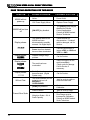
SYMPTOM
POSSIBLE PROBLEM
PROBABLE SOLUTION
Scale in Motion
Must be enabled in
Calibration.
Wait for scale to settle.
Cannot Tare a negative
weight
Remove weight, clear scale
and re-enter Tare.
Cannot Select a
Scale Channel
Scale Channel is Disabled.
Scale Channels (other than
CH1) must be enabled in
Calibration Mode. Consult
an M2000 trained Scale
Technician.
Display segments
missing
LED may need replacement
Use the TEST DISPLAY
function to confirm. Call for
Service.
Keypad may need
replacement
Remember that some
keypad functions may be
disabled. Call for Service.
Tare function disabled
Cannot Tare Scale
No response to
Key presses
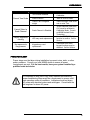
POWER PROBLEMS?
Proper steps must be taken during installation to prevent noise, static, or other
power problems. Consult your local M2000 dealer to ensure all power
requirements are met. For the best results, have your system installed by a
qualified scale technician.
It is important to note that in very noisy industrial environments,
power-conditioning filters would be a requirement to ensure a failsafe operation under all conditions. Indicators should not share
AC power with electrical motors and switchgear. Consult with the
site engineer for clean AC power.
19