1
Long Term Model USER MANUAL, February 2001
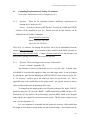
6.1.7 (a) Question: How do I set the number of years 1, 2, 3, 4 or 5 that are in each
growth period?
Answer: It can be seen that n, which is the notation for the number of years in
each period, is equated to DW at the end of Section 1, Appendix VII (gms file).
To change the number of years, n, go to the sixhr.inc file, Appendix I. The value
of n can be changed on the first line of this file. A value of n = 2 is shown in Appendix I.
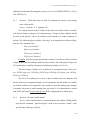
6.1.7 (b) Question: How do I set the number of time periods?
Answer: By setting the Yper values. Section 2, Appendix II.
Example:
If 4 time periods are required then a value of 1 is given to Per1, Per2, Per3, and
Per4.
i.e.,
Per1 = 1
Per2 = 1
Per3 = 1
Per4 = 1
Per5 = 0
Per6 = 0
Per7 = 0
Per8 = 0
Per9 = 0
Per10 = 0
Note: At no time should any values of 1 be interspersed with a value of 0.
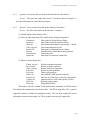
The model has a maximum availability of 10 growth periods, and each period will
contains a specific number of years (i.e., 1, 2, 3, 4 or 5). (Time period 0 is always the
Baseyear).
Example:
Let the number of years in each period be n.
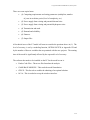
If n = 2 and the Baseyear is 2000, with 4 time periods:
Period 0 is year 2000, January 1.
Period 1 is from January 1, 2000 to December 31, 2001.
Period 2 is from January 1, 2002 to December 31, 2003.
Period 3 is from January 1, 2004 to December 31, 2005.
Period 4 is from January 1, 2006 to December 31, 2007.
117