1
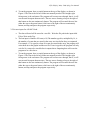
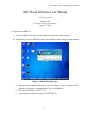
 UTA-HEP/LC 0024, VME DAQ User Manual d. To run the program, there a couple buttons at the top of the display, as shown in
Figure 4. The four to the left are all that are normally needed. The straight, right
facing arrow is the run button. The program will execute once through, that is, it will
execute until it outputs data one time. The two arrows forming a loop to the right of
that button are the run continuously button. The program will run until the user hits
either the stop or the pause button, which are to the right of the run continuously
button, and stop and pause the program respectively.
3-2 Set user inputs for All ADC Read.
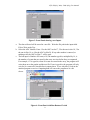
a. The data collected will be stored in a text file. Write the file path in the input titled
File to Write at the Top.
b. The last input is Number of Events (x16) The number typed in, multiplied by 16, is
the number of events that are stored in the array at a time before they are outputted.
For example, if 3 is typed in, when 48 events are stored in the array, the program will
write them out to the graphs and the text file. If one is typed in, the program will only
wait for 16 events to be stored before it outputs them. Outputing data will cause the
program to be a bit slower.
c. To run the program, there a couple buttons at the top of the display, as shown in
Figure 4. The four to the left are all that are normally needed. The straight, right
facing arrow is the run button. The program will execute once through, that is, it will
execute until it outputs data one time. The two arrows forming a loop to the right of
that button are the run continuously button. The program will run until the user hits
either the stop or the pause button, which are to the right of the run continuously
button, and stop and pause the program respectively.
4