1
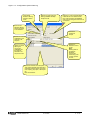
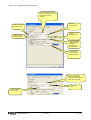
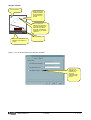
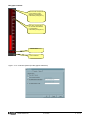
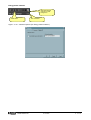
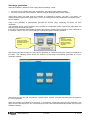
Figure 2.2 – Configuration-Options-Multimeters
Selected
multimeter
Total number of
configured
multimeters
Add a new
multimeter to the
network
configuration
Enables / disables
the serial
communication
with the selected
multimeter
Selects the
previous / next
multimeter
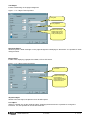
Description of the
multimeter. It is
used to identify
the multimeter in
pages, data log,
alrms and more.
Nominal value
setting for the
indicator scale
(sets 100% of bar
graph indicators
etc.)
Must be set
according to the
multimeter CT and
VT ratio settings.
If the option
Connection by
TCP-IP is enabled,
this fields define
the IP address and
IP port of the
Ethernet gateway
where this
multimeter is
connected.
Defines if an
alarm message
must be stored
when digital
output 1 trips
Same as above,
referred to digital
output 2
MSGB105$0500.doc
Removes the last
multimeter from
the network
configuration
Text of the alarm
to be stored when
output 1 trips
Text of the alarm
to be stored when
output 2 trips
30.10.2009
Maximum value
setting for the
indicator scale
(sets full scale of
all indicators)
Must be set
according to the
multimeter CT and
VT ratio settings.
P. 8 / 39