1
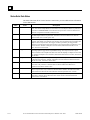
Appendix Instruction Mnemonics
C
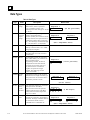
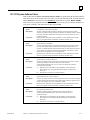
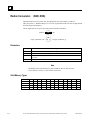
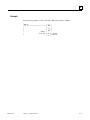
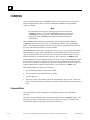
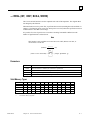
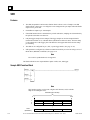
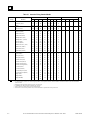
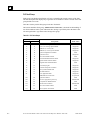
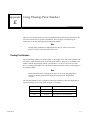
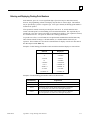
In Program Display/Edit mode, you can quickly enter or search for a programming instruction by
typing the ampersand (&) character followed by the instruction’s mnemonic. For some
instructions, you can also specify a reference address or nickname, a label, or a location reference
address.
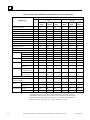
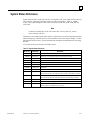
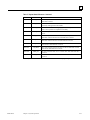
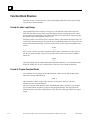
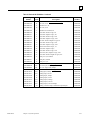
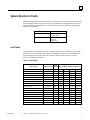
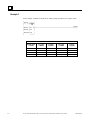
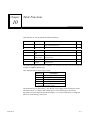
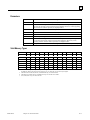
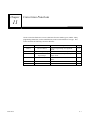
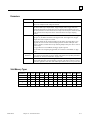
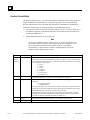
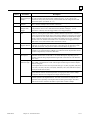
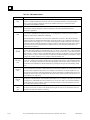
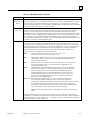
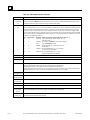
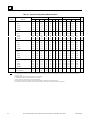
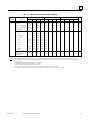
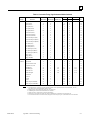
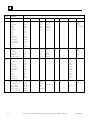
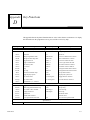
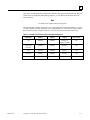
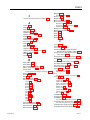
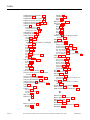
This appendix lists the mnemonics of the programming instructions for Logicmaster
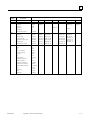
90-30/20/Micro programming software. The complete mnemonic is shown in column 3 of this
table, and the shortest entry you can make for each instruction is listed in column 4.
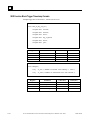
At any time during programming, you can display a help screen with these mnemonics by
pressing the ALT and I keys.
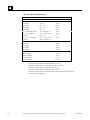
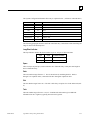
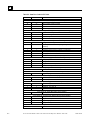
Function
Group
Mnemonic
Instruction
All
Contacts
Coils
Links
Timers
Counters
GFK-0467L
INT
Any Contact
&CON
&CON
Normally Open Contact
&NOCON
&NOCON
Normally Closed Contact
&NCCON
&NCCON
Continuation Contact
&CONC
&CONC
Any Coil
&COI
&COI
Normally Open Coil
&NOCOI
&NOCOI
Negated Coil
&NCCOI
&NCCOI
Positive Transition Coil
&PCOI
&PCOI
Negative Transition Coil
&NCOI
&NCOI
SET Coil
&SL
&SL
RESET Coil
&RL
&RL
Retentive SET Coil
&SM
&SM
Retentive RESET Coil
&RM
&RM
Retentive Coil
&NOM
&NOM
Negated Retentive Coil
&NCM
&NCM
Continuation Coil
&COILC
&COILC
Horizontal Link
&HO
&HO
Vertical Link
&VE
&VE
On Delay Timer
&ON
&ON
Elapsed Timer
Off Delay Timer
&TM
&OF
&TM
&OF
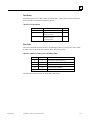
Up Counter
&UP
&UP
Down Counter
&DN
&DN
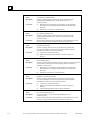
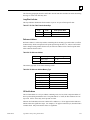
DINT
BIT
BYTE
WORD
REAL
C-1