1
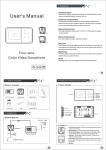
User Manual
-.
20130314 -24page .ai
6 2013/5/17 T 午 04:43:01
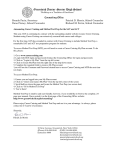
2 Operations
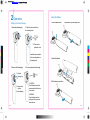
Loading the Batteries
Setting up the Video Otoscope
1. Push the release button.
1. Remove the fastening ring.
2. Slide down to open the battery cover.
2. Align the camera module to
the mounting base.
2.1 Remove the
protective cover.
C
M
Insert the camera module
V
to the mounting base via
the mating parts
CM
MV
3. Load in the batteries.
CV
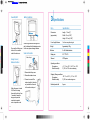
3. Screw on the fastening ring.
CMV
4. Put on new speculum before using.
K
3.1 Align the
fastening ring.
3.2 Screw it down
to tighten.
(Do not overtighten)
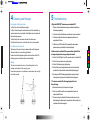
4.1 CAPPING:
Push the flanged end onto the
camera module until it clicks into
a lock position.
4.Put the battery cover back on.
4.2 REMOVE :
Press the flanged end of the
rigid speculum to remove and
discard after use.
08
09