1
Grant Agreement No.: 261527
Mantychore
IP Networks as a Service
Instrument: Combination of Collaborative Project and Coordination and Support Action
Thematic Priority: [INFRA-2010.1.2.3] Virtual Research Communities
D3.1User Manual
Due date of the Deliverable: Month 6
Submission of release 1.0: 30th, March, 2011
Re-submission date: 2nd August, 2012
Start date of project: October 1st 2010 Duration: 30 months
Project Manager: Sergi Figuerola (i2CAT)
Version: v.1.1
Deliverable leader: i2CAT
Authors list: Evelyn Torras (i2CAT), Pau Minoves (I2CAT)
Technical Reviewers: Stefan Liström (NORDUnet), Alin Pastrama (NORDUnet),
Tangui Coulouarn (UNI-C)
Language reviewers: Peter Lavin (TCD).
Project co-funded by the European Commission in the 7th Framework Programme (2007-2013)
Dissemination Level
PU
Public
PP
Restricted to other programme participants (including the Commission Services)
RE
Restricted to a group specified by the consortium (including the Commission Services)
CO
Confidential, only for members of the consortium (including the Commission Services)
User Manual
Project
Doc
Date
Mantychore
D3.1
2 August 2012
Document Revision History
Revision
Date
1.0
30-March2011
1.1
2-Aug-2012
Description of change
Reference
First release
Section 5.2.1 - Topics
Section 5.2.2 – Topics
Section 5.2.3 – Topics
Annex I: OpenNaaS Documentation: updated
First Period Review:
Recommendations
concerning the period
under review, milestones
and deliverables
Abstract
This deliverable aims to give content guidelines and define requirements and procedure for the
creation of the user documentation. The user documentation support users, serve as basis for
training documentation and aims to boost participation and interest in the project. It also serves
as technical documentation about the Mantychore tool and can be used as a presentation to
show the current state of the project to external and internal members of the community.
User Manual
Project
Doc
Date
Mantychore
D3.1
2 August 2012
Table of Contents
1
2
3
Executive summary ............................................................................................................... 1
Introduction ........................................................................................................................... 2
Goals and focus .................................................................................................................... 3
3.1 Goals in relation to work packages .................................................................................. 3
3.1.1 WP3 ............................................................................................................................. 3
3.1.2 WP4 ............................................................................................................................. 3
3.1.3 WP5, WP6 and WP7 .................................................................................................... 3
3.2 Documentation Requirements.......................................................................................... 4
3.2.1 Different user group requirements ................................................................................ 4
4 Continuous updating ............................................................................................................. 5
4.1 Work package updating process ...................................................................................... 5
4.1.1 WP2 dissemination ...................................................................................................... 5
4.1.2 WP3 ............................................................................................................................. 6
4.1.3 WP4 software refinement ............................................................................................. 6
4.1.4 WP5, WP6 and WP7 .................................................................................................... 6
4.2 Feedback ......................................................................................................................... 7
5 Information and accessibility ................................................................................................. 9
5.1 Content Structure............................................................................................................. 9
5.1.1 Getting Started ............................................................................................................. 9
5.1.2 System architecture ................................................................................................... 10
5.1.3 Tools and Existing User Interface ............................................................................... 10
5.1.4 References and external API...................................................................................... 10
5.2 Customized information and accessibility ...................................................................... 11
5.2.1 Infrastructure provider and Service provider ............................................................... 12
5.2.2 End users ................................................................................................................... 13
5.2.3 Developers ................................................................................................................. 13
6 User Documentation............................................................................................................ 14
7 References .......................................................................................................................... 15
8 Acronyms ............................................................................................................................ 16
ANNEX I ..................................................................................................................................... 17
User Manual
Project
Doc
Date
Mantychore
D3.1
2 August 2012
Figure Summary
Figure 4.1 Feedback cycle ........................................................................................................... 6
Figure 4.2 User documentation feedback cycle ............................................................................ 7
Table Summary
Table 5.1 Actors in use case ...................................................................................................... 12
User Manual
Project
Doc
Date
Mantychore
D3.1
2 August 2012
1 Executive summary
The user documentation is a way to communicate with the Mantychore community, support
users, serve as basis for training documentation and boost participation and interest in the
project. It also serves as technical documentation about the Mantychore tool and can be used as
a presentation to show the current state of the project to external and internal members of the
community.Therefore it is important that the user documentation meets its goals and
requirements.
The present document provides the guidelines and the requirements and procedures for the
creation of the user documentation. The deliverable is organized as follows.
First, the main goals and requirements that user documentation has to achieve within the
Mantychore project are presented. Next section will outline the procedures for maintenance of
the user documentation, including the updated coming from the work packages and the user
feedback process.
Then, the information contained on the user documentation is described. This section is divided
in two parts. In one hand, it details the contents of the user documentation. It will expose a
detailed table of contents of the user documentation and a detailed explanation of the topics
included in the documentation.
On the other hand, the user documentation will contain a personalized page for each user type.
The aim is to provide the expected cohesion between the Mantychore community and the project.
The personalized table of contents created for each user type is presented in this section.
Finally, the user documentation is presented. This is the full document that users can consult
through the wiki.
1
User Manual
Project
Doc
Date
Mantychore
D3.1
2 August 2012
2 Introduction
This document presents the action plan to create the user documentation and is delivered under
Work Package 3 (WP3). It will describe how users get the information and what the content
should be. It will also outline the procedures for maintenance of the documentation, including
updates to reflect interaction between work packages. Finally, this deliverable will expose a
detailed table of contents of user documentation.
The Mantychore community consists of developers, end users and infrastructure providers. The
project user community is drawn from a pool of groups which have an interest in IP Networks as
a Service (IPaaS). The initial user community or end users of the software are: the Danish HDN
(Health Data Network), the British UHDM (Ultra High Definition Media) group and the Irish Grid
network (Grid-Ireland).
Within Mantychore community, the network infrastructure is provided and managed by National
Research Educational Networks (NRENs). The initial NRENs belonging to Mantychore
community are HEAnet, NORDUnet and UNI-C. They will use the Mantychore software at
management and administration level.
WP3 is responsible for consolidating the Mantychore community and expanding the use of
IPaaS. Within WP3, Task 3.1 is focused on extending contacts with existing user organizations
and projects, requirements gathering and providing IP networks for their work and experiments.
WP3 has a further goal to attract new NRENs that are willing to provide IPaaS on their einfrastructure to their user communities. WP3 also involves training and related activities for
NRENs and the user community (Task 3.2).
The use cases defined within the Mantychore project (Requirements Analysis Report [D.4.1])
contain the requirements of each of the project participants. Each use case describes the actors
involved in each scenario and their software functionality expectations. The documentation will
provide information about the software functions on a per actor basis as requested in the use
cases.
The user documentation is a technical communication, intended to give assistance for use of
particular components of the software. Typically, component capabilities, limitations, options,
inputs and expected outputs, special instructions and error messages are provided. In this case
of the Mantychore project, the main goals are:
•
•
•
•
•
Give the user the necessary information to deploy and use and enhance their
understanding of the software.
Serve as the basis of a complete training program for the user community.
Serve as technical resource for presentation documents about the Mantychore tool.
Show the vitality and accurate state of the project.
Consolidate and enlarge the user community.
2
User Manual
Project
Doc
Date
Mantychore
D3.1
2 August 2012
3 Goals and focus
The Mantychore user documentation is focused on giving extended information to the
Mantychore community, aiming to provide a full description of the software capabilities,
installation and configuration.
3.1 Goals in relation to work packages
The user documentation will be useful to all work packages within the project, serving different
tasks and objectives of each one. The main goals are described below. The main goals are
described below and are classified according to the work packages they serve.WP2
WP2 is responsible for the dissemination of evaluation reports, publications and results about the
deployment of Mantychore by NRENs and the selected user community. WP2 also has
responsibility for liaising within the project, including management of mailing lists and
standardization of presentations and maximising the impact of dissemination in general.
The user documentation serves as an initial basis for this dissemination materialand may be used
as a resource for technical presenting about the project.
3.1.1 WP3
WP3 is responsible for documentation and training. Mantychore has an open project policy and
aims to attract new users to join the community. The user manual will be the visible face of
software, in particular for new users. Therefore it must properly reflect the functionalities and the
potential of the software.
In addition to providing information about using the software, the user manual has the following
aims to:
•
•
•
Enlarge and consolidate the user community.
Serve as the basis for a complete training program for the Mantychore community.
To be understood by the entire Mantychore community, regardless of their technical
knowledge.
Failure to fulfill these requirements will lead to difficulties in attracting new users. The
documentation must provide an appropriate level of abstraction for a broad range of user
backgrounds.
3.1.2 WP4
WP4 addresses software development, thus, the user documentation should provide developers
with a complete description of the software, and should in particular aim to serve developers
joining the project mid-way through the project cycle.
3.1.3 WP5, WP6 and WP7
•
The main goal of WP5 is to deploy Mantychoreservices into an operational environment,
where NRENs have the software installed and offer this new type of service to the user
communities.
3
User Manual
•
•
Project
Doc
Date
Mantychore
D3.1
2 August 2012
WP6 is in charge of designing a Marketplace specifically for Mantychore.Mantychore will
start collaboration with GSN (GreenStar Network) project.
WP7 is in charge of analysing and describing the use case derived from that
collaboration.
3.2 Documentation Requirements
The user documentation has to meet the following constraints and requirements within the
bounded time and resources of the project:
Reusability: Documentation is time consuming. Therefore, it is desirable to be able to reuse
information and material where possible without having to instigate a complete rewrite of sections
of the manual.
Scale and Scope: Given the scale and volume of the documentation required by this project, a
balance has to be found. The documentation should remain of a limited scale so that it remains
manageable within the bounded constraints of the project. However, it should be comprehensive
enough to provide the knowledge necessary to use all functionalities and to meet the other
requirements outlined in this document.
Veracity and Staleness: The documentation has to be routinely amended at each software
release, always reflecting the current state of the software. This is important both for internal
users who are required to give feedback on the documentation, and also for external users who
need to understand the software and how it works.
3.2.1 Different user group requirements
As mentioned in the introduction the Mantychore community consist primarily of three user
groups; end users, providers and developers. These three groups of people have different
information requirements in regards to the user manual. The user manual aims to provide a full
description of the software capabilities. However below are the main required information for
each group, that the user documentation has to cover.
For the end user the main information requirements regarding the Mantychore service are:
How to access their customized user interface
How to use it
4
User Manual
Project
Doc
Date
Mantychore
D3.1
2 August 2012
For the provider the main information requirements regarding the Mantychore service are:
How to install it
How to use it
How to manage it
How it works
How to troubleshoot it
How to get help
For the developer the main information requirements regarding the Mantychore service are:
How it works
How to access the code base
How to build it
How to extend it or connect to it
4 Continuous updating
To reflect the development cycles of the software, the user documentation will constantly change
over the life of the project. It is therefore essential to define an action plan to update the
documentation to reflect software changes or when user’s need change.
This section describes the procedures to be used to for updating the documentation. First of all,
the existing interaction between other work packages and the user manual is analysed. Then the
feedback process will be described.
4.1 Work package updating process
Each work package has a different function within the project. Communications between work
package activities or tasks are necessary in order to preserve the unity of the project. This
section outline how work packages will interact with WP3 for the purpose of keeping the user
manual updated.
4.1.1 WP2 dissemination
WP2 will use the user documentation as a resource for make technical presentations. Therefore,
the task of WP2 is more oriented to promote the use and the visibility of user documentation than
to update the content.
The user documentation will be published on the project’s wiki page; also, in the official project
website a direct link to it will appear. Task 2.1 from WP2 is in charge of the dissemination.
Accordingly, it is the responsible to make the content accessible to all users and to promote its
use in presentations, documents, etc.
5
User Manual
Project
Doc
Date
Mantychore
D3.1
2 August 2012
4.1.2 WP3
Task 3.2 of WP3, as responsible for generating the documentation guidelines, will be in charge of
keeping the content coming from other work packages up-to-date and to keep the documentation
inside the wiki page ordered.
4.1.3 WP4 software refinement
Developers will have firsthand exposure to dealing with user questions relating to software and
routine bug fixing. Therefore, this group will be responsible for documenting solutions of such
questions, clarifications and bugs. New information generated by this process will contribute to
FAQs pages and bug reports. This information will be sent via mailing list to the Task 3.2 who will
have sole responsibility for assembly of the manual.
4.1.4 WP5, WP6 and WP7
These work packages will be the responsible of the tool testing in real environments. For that
reason they are in charge of reporting any suggestion they have regarding the tool or the user
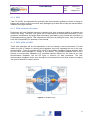
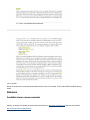
documentation. Figure 4.2 shows the life cycle of the software feedback process between WP4
and the other work packages in charge of tool testing. The software feedback has its own
process to communicate feedbacks (e.g. periodical reports) different for the ones for the user
documentation feedback. But the life cycle is common for both processes. The user
documentation feedback will be done through the tools described in the next section and taking
into account that WP3 is also involved.
Figure4.1 Feedback cycle
6
User Manual
Project
Doc
Date
Mantychore
D3.1
2 August 2012
4.2 Feedback
As Mantychore deployment will be a pre-operational activity with real users, it will be necessary to
receive feedback from them to improve the Mantychore services and correct the bugs that could
appear. Mantychore deployment is not in a pilot phase to correct bugs, but an evaluation that
determines whether the Mantychore services are useful for each particular research community.
When the pre-operational phase is successful, the service can be deployed on an operational
level to a larger community.
The aim of a feedback procedure is to increase the vitality of the project and boost the interaction
between Mantychore community members. The feedback provides the opportunity toimprove the
quality of the documentation and adapting it to the user's needs. Any proposal of change about
the user documentation must be submitted to WP3. This feedback will be done through
comments posted on the wiki page where the user documentation is published. In the case the
feedback is too extended the comments will be sent through the mailing list.
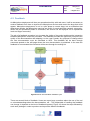
Figure4.2 User documentation feedback cycle
There are several kinds of feedback. Users can report bugs, questions about the use of the tool
or misunderstandings about the documentation, etc... The responsible of handling the feedback
can change; it depends on the kind of feedback reported. Figure 4.3 shown the steps followed by
each work package in order to produce and report the different feedbacks.
7
User Manual
Project
Doc
Date
Mantychore
D3.1
2 August 2012
Users from WP5, 6 and 7 will create the feedbacks which can be sent directly to WP4 (in the
case of software feedback) or send to the WP3 which will evaluate if they can update the user
documentation e.g. information misunderstanding. If they cannot, then the feedback will be sent
to WP4 in order for them toanswer the user or make the necessary changes (it depends on the
kind of feedback). Once the changes in documentation are done then it will be updated, always
by WP3. Whenever there is an update the Mantychore community will be informed (mailing list)
about the changes, in order to maintain the vitality of the project and the interaction with users.
8
User Manual
Project
Doc
Date
Mantychore
D3.1
2 August 2012
5 Information and accessibility
This section defines the content of the user documentation.The goal is to detail the main
headings and structure of the user documentation, each heading targeting different audiences
and aiming to best fit prior levels of knowledge.
5.1 Content Structure
The users must be able to access content at a level appropriate to their needs. For this reason,
information will be presented in a progressive and logical manner. Mantychore is an open project
and uses software from many other open source projects. With an aim to attracting new
community members, the user manual should contain common heading to other open source
project. Examples are the Apache Software foundation [Apache] and OPS4J [OPS4J]. The
headings which will be used to describe the software and project contents are:
1. Getting Started
1. Project Overview
2. Licensing
3. Get involved
4. Get the Source Code and build it.
5. Quick Feature Set
6. Deploying Mantychore
1. Requirements
2. Maintenance
2. System Architecture
1. Overall architecture and components
2. Protocols involved
3. Using the Mantychore API
1. Creating your own client
2. Adapting already existing clients
3. API capabilities
4. Tools
1. Resource Management Center
1. [Previous Manticore 2 documentation on the GUI]
2. Server Console
1. How to access it
2. Commands
5.1.1 Getting Started
This information should be of interest to everyone but is aimed at first time and entry-level users.
It contains basic information about the project.
The following topics must be covered in this section:
•
•
•
•
Brief description of the project and its goals.
Contact details for the development team.
The distribution license.
How to become involved in the project and make contributions.
9
User Manual
•
•
•
•
•
Project
Doc
Date
Mantychore
D3.1
2 August 2012
System and software requirements
How to get the latest version of the software.
How to build the developing framework.
A complete list of the features of the software using the following approach...
o What: description of the feature, what it does.
o How: the way it works.
o When: possible use case.
o Who: which users can use it.
o Configuration rules: how the user can configure the feature for their purposes.
Other software and project information: maintenance, release roadmap and repositories.
5.1.2 System architecture
This section is intended to serve NRENs and software developers. It gives information about the
internal design of the tool and the protocols used for network configuration and management. The
following points should be considered:
•
•
Comprehensive information regarding these topics is important for technical users, in
particular users who wish to integrate the Mantychore architecture with their existing
infrastructure.
This section will also be useful for external developers wishing to contribute to the project
(by adding new features, plugins, new functionality or improvements). It should aim to
provide such a developer with a complete overview of how Mantychore's system is
structured, available APIs and the protocols used.
5.1.3 Tools and Existing User Interface
This section describes the user interface for the Mantychore software, its functionality set and
associated tools.
The first Mantychore GUI will be based on the interface created for Manticore project [Manticore]
(Resource Management Center) as the functionalities and operation will be almost the same. The
documentation of the Mantychore interface will be available when the Task 5.2 is underway and
will be added at that time.
Currently, the topics for in this section are:
•
•
How to use the Resource Management Center GUI
o Detailed guidelines of operations
Administration Server Console for Mantychore Servers
o Configuration commands
5.1.4 References and external API
This section will detail the Application Program Interface (API) of the Mantychore software, what it
provides and how developers can use it.
WP3 aims to liaise with other projects; however external user's needs may not be fulfilled by the
initial features of the software. Therefore it is important to meet the requirement of this user
group.
10
User Manual
Project
Doc
Date
Mantychore
D3.1
2 August 2012
For this reason, detailed documentation on how to use the API and create customized interfaces
and clients is required for external users and developers. The topics described in this section are:
•
•
•
How to create your own client.
How API is used in already existing clients.
Description of API capabilities and signatures.
5.2 Customized information and accessibility
The information will be presented via the "personal landing page", which contains the
personalized table of contents created for each user. That kind of personalization provides the
expected cohesion between the Mantychore community and the project besides to reflect the
interest of the project to satisfy the user's needs.
The aim of the page is to improve the accessibility of the content, satisfy the needs of all users
within the Mantychore community and give through the manual the right level of abstraction for
each one.
The initial community of three end users will act as consumers for the Mantychore software. It is
made up of the following groups:
•
•
•
Trinity College Dublin
University of Essex
UNI-C, Danish IR-Centre for Education and Research
NRENs (as network infrastructure providers) have a role in configuration and management and
can also be considered users. Hence, they have a documentation requirement in relation to using
Mantychore within their infrastructure.
Based on analysis of the scenarios described in [D4.1], three roles have been identified which
apply to the Mantychore user community.
Infrastructure Provider: In Mantychore, NRENs are the owners and providers of network
infrastructure to user communities.
Service Provider or Virtual Operator: Can harvest infrastructure instances from one or more
Infrastructure Providers and integrate them into their management domain. These are then used
to provide services to end users.
End User: uses of the services offered by the Virtual Operator.They receive several
infrastructure resources and create one or more IP Networks out of them. Users are empowered
to make limited changes to the IP network service, but will not have the same permissions
available to Infrastructure or Service Providers. In general, virtual operators will control the
permissions of each individual user.
11
User Manual
Project
Doc
Date
Mantychore
D3.1
2 August 2012
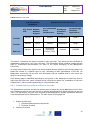
Table5.1Actors in use case
Virtual CPE for Health
and Educational
Institutions
UC2.
UC1.Virtual Multiple
CPE
Network
Support
Distributed and Private Cloud
UC4.
UC3. Distributed
Distributed
Cloud
Virtualized
Infrastructure
Hosting
UC5.Ultra High
Definition
Applications
Infrastructure
Provider
HEAnet
UNI·C
HEAnet
NORDUnet
JANET
Service
Provider
HEAnet
UNI·C
HEAnet
NORDUnet
JANET
Campus
Hospital
Grid-Ireland
Operations
Centre (TCD)
Campus
UESSEX
End User
The table 3.1 describes the actors involved in each use case. The actors are the individuals or
organisations that play a role in the use case. This information allows creating a page that will
point to customized documentation for each of the actors belonging to the Mantychore
community.
All users have access to the whole user documentation but the intention of the landing page is to
adapt the content to a specific type of user, according to their expectations of the tool. As
Mantychore community use the tool, this information may be modified due to user needs are
likely to evolve during usage.
Each landing page is classified according to user groups in the Mantychore community. But for
users with the same role, some contents will be common but others, as “installation in user own
infrastructure”, will be created specifically for each particular user.
5.2.1 Infrastructure provider and Service provider
The infrastructure provider and service provider have to know how to use Mantychore tool in their
own infrastructure since they use the tool to manage and operate their IPaaS provided to the end
users. For that reason, they are more focused on the Mantychore's system architecture and how
it can be deployed in their infrastructure. The main topics for this page are:
1. System Architecture
1. Overall architecture and components
2. Protocols involved
2. Features Overview
12
User Manual
Project
Doc
Date
Mantychore
D3.1
2 August 2012
1. Supported infrastructure
3. Deploy and run OpenNaaS
1. Installation in user own infrastructure
4. User Interfaces
1. Server Console
2. Remote API
5. Security
5.2.2 End users
End user only needs to know about what Mantychore is, which their features are and how to use
the tool to configure their own scenario.The headings of this personalized landing page are
1. Getting Started
1. Project Overview
2. Features Overview
3. Using OpenNaaS
1. OpenNaaS known clients
2. Remote API
3.
5.2.3 Developers
Last kind of landing page is for developers, who are not considered in the scenarios but have a
relevant importance within the project, since they are part of the Mantychore community and will
deploy the tool. They need to know about how to get the source code, the system architecture
and how to create their personal application. The detailed topics of the landing page are:
1. Getting Started
1. Project Overview
2. Licensing
3. Get involved
4. Get the Source Code and build it.
5. Quick Feature Set
6. Deploying OpenNaaS
1. Requirements
2. Maintenance
2. System Architecture
1. Overall architecture and components
2. Protocols involved
3. Using the OpenNaaS API
1. User Interfaces
1. Known clients
4. Extending OpenNaaS
1. Adding support for other infrastructure
2. Creating your own client
13
User Manual
Project
Doc
Date
Mantychore
D3.1
2 August 2012
6 User Documentation
Now are presented the pages forming the user documentation. They are imported as appears on
the wiki of the Mantychore project.
14
User Manual
Project
Doc
Date
Mantychore
D3.1
2 August 2012
7 References
[D4.1]
Mantychore consortium. February 2011. Deliverable 4.1 Requirements analysis
report. Available
http://jira.i2cat.net:8090/download/attachments/8028762/MANTYCHORE_WP4_D
4.1-v1.1.pdf?version=1&modificationDate=1300183253000
[Apache]
Apache foundation.Retrieved March 2011. Available on http://www.apache.org/
[OPS4J]
Open Participation Software for Java. Retrieved March 2011. Available on:
http://srv07.ops4j.org:8081/display/ops4j/Open+Participation+Software+for+Java
[Manticore]
Manticore project. Available on: http://www.i2cat.net/en/projecte/manticore-1
15
User Manual
Project
Doc
Date
Mantychore
D3.1
2 August 2012
8 Acronyms
IPaaS
IP Network as a Service
GUI
Graphical User Interface
HDN
Health Data Network
NREN
National Research Educational Network
UHDM
Ultra High Definition Media
16
User Manual
Project
Doc
Date
Mantychore
D3.1
2 August 2012
ANNEX I
DOCUMENTATION
17
1. Getting started . . . . . . . . . . . . . . . . . . . . . . . . . . . . . . . . . . . . . . . . . . . . . . . . . . . . . . . . . . . . . . . . . . . . . . . . . . . . . . . . . . . . . . . . . . . . . .
1.1 OpenNaaS Roles . . . . . . . . . . . . . . . . . . . . . . . . . . . . . . . . . . . . . . . . . . . . . . . . . . . . . . . . . . . . . . . . . . . . . . . . . . . . . . . . . . . . . . .
2. Users Guide . . . . . . . . . . . . . . . . . . . . . . . . . . . . . . . . . . . . . . . . . . . . . . . . . . . . . . . . . . . . . . . . . . . . . . . . . . . . . . . . . . . . . . . . . . . . . . . .
2.1 System Architecture . . . . . . . . . . . . . . . . . . . . . . . . . . . . . . . . . . . . . . . . . . . . . . . . . . . . . . . . . . . . . . . . . . . . . . . . . . . . . . . . . . . . .
2.1.1 Security . . . . . . . . . . . . . . . . . . . . . . . . . . . . . . . . . . . . . . . . . . . . . . . . . . . . . . . . . . . . . . . . . . . . . . . . . . . . . . . . . . . . . . . . . .
2.1.2 User Interfaces . . . . . . . . . . . . . . . . . . . . . . . . . . . . . . . . . . . . . . . . . . . . . . . . . . . . . . . . . . . . . . . . . . . . . . . . . . . . . . . . . . . .
2.1.2.1 Server Console . . . . . . . . . . . . . . . . . . . . . . . . . . . . . . . . . . . . . . . . . . . . . . . . . . . . . . . . . . . . . . . . . . . . . . . . . . . . . . .
2.1.2.2 Remote API . . . . . . . . . . . . . . . . . . . . . . . . . . . . . . . . . . . . . . . . . . . . . . . . . . . . . . . . . . . . . . . . . . . . . . . . . . . . . . . . . .
2.1.2.3 Known clients . . . . . . . . . . . . . . . . . . . . . . . . . . . . . . . . . . . . . . . . . . . . . . . . . . . . . . . . . . . . . . . . . . . . . . . . . . . . . . . . .
2.2 Feature Overview . . . . . . . . . . . . . . . . . . . . . . . . . . . . . . . . . . . . . . . . . . . . . . . . . . . . . . . . . . . . . . . . . . . . . . . . . . . . . . . . . . . . . . .
2.2.1 Supported resources, capabilities and drivers . . . . . . . . . . . . . . . . . . . . . . . . . . . . . . . . . . . . . . . . . . . . . . . . . . . . . . . . . . . .
2.2.1.1 Compatibility Matrix . . . . . . . . . . . . . . . . . . . . . . . . . . . . . . . . . . . . . . . . . . . . . . . . . . . . . . . . . . . . . . . . . . . . . . . . . . . .
2.3 Deploy and run OpenNaaS . . . . . . . . . . . . . . . . . . . . . . . . . . . . . . . . . . . . . . . . . . . . . . . . . . . . . . . . . . . . . . . . . . . . . . . . . . . . . . . .
2.4 Getting support . . . . . . . . . . . . . . . . . . . . . . . . . . . . . . . . . . . . . . . . . . . . . . . . . . . . . . . . . . . . . . . . . . . . . . . . . . . . . . . . . . . . . . . . .
2.4.1 Frequently Asked Questions . . . . . . . . . . . . . . . . . . . . . . . . . . . . . . . . . . . . . . . . . . . . . . . . . . . . . . . . . . . . . . . . . . . . . . . . . .
3. Developers Guide . . . . . . . . . . . . . . . . . . . . . . . . . . . . . . . . . . . . . . . . . . . . . . . . . . . . . . . . . . . . . . . . . . . . . . . . . . . . . . . . . . . . . . . . . . .
3.1 Build the project . . . . . . . . . . . . . . . . . . . . . . . . . . . . . . . . . . . . . . . . . . . . . . . . . . . . . . . . . . . . . . . . . . . . . . . . . . . . . . . . . . . . . . . .
3.2 How to create a new bundle . . . . . . . . . . . . . . . . . . . . . . . . . . . . . . . . . . . . . . . . . . . . . . . . . . . . . . . . . . . . . . . . . . . . . . . . . . . . . . .
3.3 How to create a resource . . . . . . . . . . . . . . . . . . . . . . . . . . . . . . . . . . . . . . . . . . . . . . . . . . . . . . . . . . . . . . . . . . . . . . . . . . . . . . . . .
3.4 Resources, capabilities and drivers . . . . . . . . . . . . . . . . . . . . . . . . . . . . . . . . . . . . . . . . . . . . . . . . . . . . . . . . . . . . . . . . . . . . . . . . .
3.4.1 Drivers . . . . . . . . . . . . . . . . . . . . . . . . . . . . . . . . . . . . . . . . . . . . . . . . . . . . . . . . . . . . . . . . . . . . . . . . . . . . . . . . . . . . . . . . . . .
3.4.1.1 Junos 10 router driver . . . . . . . . . . . . . . . . . . . . . . . . . . . . . . . . . . . . . . . . . . . . . . . . . . . . . . . . . . . . . . . . . . . . . . . . . .
3.4.1.1.1 Mapping Junos configuration to router model . . . . . . . . . . . . . . . . . . . . . . . . . . . . . . . . . . . . . . . . . . . . . . . . . . .
3.5 Releases . . . . . . . . . . . . . . . . . . . . . . . . . . . . . . . . . . . . . . . . . . . . . . . . . . . . . . . . . . . . . . . . . . . . . . . . . . . . . . . . . . . . . . . . . . . . . .
3.5.1 Mantychore 0.1 . . . . . . . . . . . . . . . . . . . . . . . . . . . . . . . . . . . . . . . . . . . . . . . . . . . . . . . . . . . . . . . . . . . . . . . . . . . . . . . . . . . .
3.5.2 Mantychore 0.4 . . . . . . . . . . . . . . . . . . . . . . . . . . . . . . . . . . . . . . . . . . . . . . . . . . . . . . . . . . . . . . . . . . . . . . . . . . . . . . . . . . . .
3.5.3 Mantychore 0.5 . . . . . . . . . . . . . . . . . . . . . . . . . . . . . . . . . . . . . . . . . . . . . . . . . . . . . . . . . . . . . . . . . . . . . . . . . . . . . . . . . . . .
3.5.4 Mantychore 0.6 . . . . . . . . . . . . . . . . . . . . . . . . . . . . . . . . . . . . . . . . . . . . . . . . . . . . . . . . . . . . . . . . . . . . . . . . . . . . . . . . . . . .
3.5.5 Mantychore 0.8 . . . . . . . . . . . . . . . . . . . . . . . . . . . . . . . . . . . . . . . . . . . . . . . . . . . . . . . . . . . . . . . . . . . . . . . . . . . . . . . . . . . .
3.5.6 Mantychore 0.9 . . . . . . . . . . . . . . . . . . . . . . . . . . . . . . . . . . . . . . . . . . . . . . . . . . . . . . . . . . . . . . . . . . . . . . . . . . . . . . . . . . . .
2
3
4
4
12
13
14
15
16
16
17
17
18
20
21
22
22
25
27
29
29
29
29
30
31
32
33
35
36
38
Getting started
Licensing
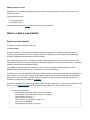
The OpenNaaS software is licensed as L-GPLv3, with the exception of the Router, Network and BoD extensions
which are ASLv2. Third party extensions can have any license.
There are a variety of ways to participate. Mantychore is an open source project (licensed under a GPL license)
providing a software toolset to the research community and their infrastructure operators. Any collaboration is more
than welcomed. We provide a number of ways to participate and collaborate with the project.
Get involved
Mailing list
OpenNaaS has a mailing list which provide support and feedback for problems. The mailing list is a good starting
point for collaboration in OpenNaaS and understanding design ideas and key concepts used in the OpenNaaS
implementation like. If you have feedback or feature requests we would love to hear them!
Check out pointers to mailing lists here:
http://www.opennaas.org/community
Development
OpenNaaS is open to the collaboration of new developers, companies, universities, which want to
participate in the implementation to any degree of implication.
If you want to build over it or just give it a try you can get the source code and built it youself. Check below for a
quick setup guide. Additionally, some resources for developers can be found in the Developers Guide
Quick Setup
This section covers how to get the project and run it.
For a quicker, less explained, setup guide check here: http://www.opennaas.org/download/
Get the project
You can obtain stable binary releases of the software here.
If you prefer to build the project from source code, you can find more detailed information at the build the project sec
tion.
Deploy and run
Once you have the software on you machine or VM, you are ready to Deploy and run OpenNaaS.
Enjoy!
Now, we have started OpenNaaS. Double tab ("Tab" key) on the CLI to see available commands or read about the
REST interface to operate it remotely.
Good pointers to learn more are:
System architecture
Server Console (CLI)
Remoting (REST API)
Known clients you can use
Developers Guide
For support, find us at:
http://www.opennaas.org/community/
OpenNaaS Roles
End-User
End-users don't run their own instance of OpenNaaS. Instead, they consume OpenNaaS enabled services either
directly from the web service or via additional middle-ware (i.e. cloud managers). In any case, we try to maintain
pointers to known clients and connectors so interfacing with OpenNaaS is effort-less as possible. Take into account
that for third party front-ends, documentation and support should be provided by the service provider.
If, instead, the end-user wants or needs to make direct calls to the OpenNaaS remote API, glance over System
Architecture to get a grasp of the basic concepts around resources and capabilities. An example work-flow for an
end-user consuming directly the OpenNaaS services would be:
1. The user obtains OpenNaaS credentials via a Service Provider.
2. The Service Provider will grant some infrastructure rights on the user. How this is achieved depends largely
on the concrete use case. Most of the time, OpenNaaS will be embedded on a higher level workflow.
3. Along with the credentials, an OpenNaaS REST API end-point for the appropriate OpenNaaS instance is
provided.
4. The user can use the OpenNaaS REST API end-point to bootstrap one of the existing clients or write his own.
5. Once connected, the user can exercise his infrastructure rights against the OpenNaaS REST API. This might
include instantiating or freeing infrastructure resources, as well as configuring those resources via their
capabilities.
You'll need some kind of authentication in order to use the remote API. Which protocol is in place will depend on the
OpenNaaS instance administrator setup. You can get and overall view of supported security protocols here. You can
then explore the remote API.
Most interesting topics for end-users:
Feature Overview
Known clients
Remote API
Service Provider
The service provider builds value services by, for example, aggregating third-party infrastructure resources and/or
providing an improved infrastructure orchestration. Although this is traditionally a role performed by the infrastructure
provider itself, the clear separation between infrastructure ownership and configuration rights enabled by
OpenNaaS, allows for a clear separation of this role.
As a service provider you can consume the services from Infrastructure Providers and/or other Service Providers. In
that case, see the End-User section above for pointers on how to interface with OpenNaaS. You can also host your
own OpenNaaS instance in order to power your infrastructure services.
You are now ready to extending OpenNaaS and develop your NaaS enabled applications.
The typical work-flow for a Service Provider looks like:
1. Deploy an OpenNaaS instance on a stable server or VM.
2. Configure the instance with your choice of database and security schema.
3. Acquire infrastructure or rights over third-party infrastructure owners or other service providers.
a. Configure this infrastructure on your OpenNaaS instance.
4. Create new services by either extending OpenNaaS or embedding it in higher level work-flow.
5. Publish your services and gather your users .
Most interesting topics for service providers:
Deploy and run OpenNaaS
System Architecture
User Interfaces
Security
Infrastructure Provider
Infrastructure owners can use OpenNaaS to expose all or part of their network resources and have tight control on
how those are lent and exploited. This schema is for owners who prefer to rent raw infrastructure instead of creating
value services themselves. For a mix role check Service Provider above.
The infrastructure provider should check the compatibility matrix for supported devices or additional needed drivers.
After getting an overview of OpenNaaS architecture and concepts, the provider needs to setup his own OpenNaaS
instance. There are several security setups available that differ on the operator's policy and existing security
infrastructure.
Infrastructure provider's work-flow is:
1.
2.
3.
4.
Deploy an OpenNaaS instance on a stable server or VM.
Configure the instance with your choice of database and security schema.
Register the infrastructure that you want to expose into OpenNaaS.
Lend to service providers.
Most interesting topics for infrastructure providers:
Deploy and run OpenNaaS
System Architecture
Compatibility Matrix
Server Console
Security
Users Guide
System Architecture
Overall architecture and components
OpenNaaS is implemented with the OSGi specification and works with Fuse Service Mix 4.4. Fuse works as a
Service platform which implements the OSGi specification. It provides a set of libraries and tools to allow easier
development of Fuse components.
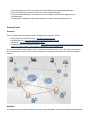
This figure shows a typical architecture.
The picture shows how an OpenNaaS user connects to the Server and how OpenNaaS connects with the devices it
manages.
The OpenNaaS software is multiplatform. To set up an OpenNaaS architecture, you need:
A Computer which is going to act as a Server. It'll have Fuse Service Mix installed, along with the
the OpenNaaS components.
SSH setup that allows access to the routers (see compatible devices).
There are two types of OpenNaaS client:
GUI Client. A desktop program implemented with RCP.
Web site. Through Ajax and RAP, it simulates the GUI client.
Internal architecture
At present, the OpenNaaS software is implemented on top of an architecture based around two core components:
resources and capabilities. With these components, OpenNaaS can describe all the necessary virtual resources (a
resource component). Resources contain the information (model) that represents itself and capability, which
represents its features.
In order to manage the resources and their capabilities, there are other components to provide required features:
SessionManager, Protocol, Model, ActionSets, ResourceManager, ...
ResourceManager, ResourceRepositories and Resources
OpenNaaS supports different types of resources (switch, routers, ...). In order to organise them, OpenNaaS can
implement different kinds of repositories that group the resources according to their type. The resource repositories
manage the resources created within the platform, it also allows persistence into the database. To allow OpenNaaS
to support new resource types creating a new repository is needed for the new ones.
The feature set provided by a resource is represented through capabilities. Each capability must be associated to a
specific type of resource according to functionalities their provide. For example, a BGP police is a feature of routers,
thus the BGP capability has to be associated to a router resource, but the same capability doesn't make sense with
switches because this resource type cannot configure BGP policies.
Since there will be a resource repository for each type of resource, it's necessary to have a global component to
manage the different repositories. The ResourceManager will be in charge of this task. It will offer a set of actions to
control the repositories and its resources.
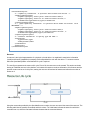
Resource Descriptor
For the creation of a resource, the ResourceManager uses a description file (ResourceDescriptor) which provides
the necessary parameters to configure a resource. For example, it contains the type, name and the capabilities that
the resource supports. Here an example of a resource descriptor is provided.
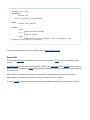
<resourceDescriptor>
<!-- Capability information. It specifies device model and version -->
<capabilityDescriptors>
<capabilityProperty value="junos" name="actionset.name"/>
<capabilityProperty value="10.10" name="actionset.version"/>
<information><type>chassis</type></information>
</capabilityDescriptors>
<!-- Queue capability information. It specifies device model and version. IT IS
OBLIGATORY -->
<capabilityDescriptors>
<capabilityProperty value="junos" name="actionset.name"/>
<capabilityProperty value="10.10" name="actionset.version" />
<information><type>queue</type></information>
</capabilityDescriptors>
<!-- Resource information. It specify type and name-->
<information>
<type>router</type>
<name>junos20</name>
</information>
<properties/>
</resourceDescriptor>
Resource
A resource is the logical representation of a physical or virtual device. As explained it contains the information
(model) and features (capabilities) necessary to allow OpenNaaS to work with the device. To create a resource
within the OpenNaaS platform a well defined life cycle is required.
The next figure represents the resource life cycle. First of all, the resource must be created. This action concludes
leaving an initialized resource in the platform. In this state the resource can show information of its features and the
protocol context can be set. At this point, starting the resource will activate its features and allow the execution of
actions on it.
Using the commands provided by the OpenNaaS server console, the user can control the state of the resource. The
following table lists the possible commands and their actions. The initial state indicates the state from which the
command can run, while the final state indicates the state that the command induces.
Resource Command
Actions
Initial State
Final State
create
- read resource descriptor
- store descriptor in the
database
No resource
INITIALIZED
start
- get capabilities
- get profiles
- execute bootstrapper
- create model
INITIALIZED
ACTIVE
stop
- reset capabilities
- reset profiles
- reset model
ACTIVE
INITIALIZED
remove
- delete resource
descriptor from the
database
INITIALIZED
No resource
Model
When a resource is initialized and started, it needs a component which maps the resource description. This
description is all the information which OpenNaaS can access from the resource. For this purpose, OpenNaaS has a
model component (based in the CIM specification) which loads all this information.
Capability
OpenNaaS links a set of capabilities to a resource where each capability represents a feature or ability which a
resource can do. For example, a router resource will be able to have capabilities related with operations for the 1, 2
and 3 level network. However, a switch resource will only be able to use capabilities for the 1 and 2 level network.
Each capability has a set of actions (named ActionSet), used to send operations to a device. Each of these is
implemented for a device and a protocol context which understands the operation.
Finally, there's a mandatory capability for all the resources, the queue capability, which main functionality is the
management of the actions which are sent to a physical device.
The definition of an ActionSet, QueueManager and its functionality will be explained better in the next issue.
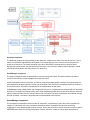
Architecture picture overview
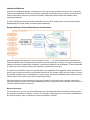
ActionSet component
The ActionSet contains the implementation of the operations, called Actions, that can be sent to a device. For this
reason, the ActionSet implementation will depend on the model and type of the resource and on the protocol to
access to the resource. The Actions belonging to the same ActionSet are implemented for a specific device
following this criteria (model, type and protocol). Each Action can be broken in different atomic operations, called
Commands, which perform the action once run on the device.
ProfileManager component
The profile manager provides the functionality to overwrite configured actions. This feature allows end users to
customize their actions in order to adapt them to their use cases.
Action customization is done via Profiles. A Profile is a end user provided bundle containing an implementation for
some OpenNaaS configured actions. Profiles may be linked to a set of resources, meaning that when a resource is
to execute an action, its profile is first checked for an implementation of that action.
ProfileManager stores loaded profiles and manages their lifecycle. It is implemented as a bundle which is continually
listening for new profiles and registers them upon arrival. Registered profiles are then able to be linked to resources
(with the restriction that a resource can be linked to only one profile).The resource descriptor must indicate, through
the field <profileId>, the name of the profile that will be associated to the resource.
QueueManager component
This component is responsible of the execution of each action. It implements a queue and a list of operations to
manage it. Furthermore, the queue implements a workflow where it is possible to restore the last working
configuration if some operations did not work correctly. Prior to the execution of the list of actions, the queue goes in
PREPARE state, where the working configuration is saved. After that, it starts to execute each queued action
(EXECUTE state). If all actions are executed correctly, the queue commits all changes and discards then backup
configuration (COMMIT state). If, on the contrary, some error happens during execution, the queue restores the
backup configuration in the ROLLBACK state.
SessionManager and Protocol component
The SessionManager controls the protocol components and provides connectivity to the different devices. It
searches available protocols among all services, registers them, and serves registered protocols' sessions upon
request. eg: When the QueueManager needs to connect with some device, it asks the SessionManager, which
searches among its configured protocol sessions a proper session to connect.
Event manager component
The Event Manager is a Karaf service which OpenNaaS uses to communicate the components. It provides an Event
Notify-Listener service which is used to implement the alarm management in the Luminis module. This is an
example about how this alarm management works for optical switches.
The EventManager provides its methods to the ProtocolWonesys and ProtocolSessionManager
The Protocol Wonesys events are listened for the ProtocolSessionManager
The ProtocolSessionManager converts these events to Capability Alarms which is registered in the
AlarmRepository
The Monitoring Capability provides Karaf commands to control the Alarm Repository service
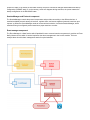
Protocols Used
Protocols
These are OpenNaaS main protocols used to configure and manage the network.
HTTP (HyperText Transfer Protocol) - http://www.w3.org/Protocols/
WS (Web Service) - http://www.w3schools.com/webservices/ws_intro.asp
NETCONF - http://en.wikipedia.org/wiki/NETCONF
WSMA (Web Services Management Agent) - http://www.cisco.com/en/US/docs/ios/netmgmt/configuration/gui
de/nm_cfg_wsma_ps6441_TSD_Products_Configuration_Guide_Chapter.html
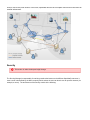
In the image, the different protocols involved in a OpenNaaS architecture can be seen. The green lines represent
the communications to the devices.The red lines represent communication among servers, GUI and OpenNaaS
software.
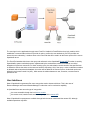
Workflow
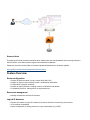
This image presents a possible infrastructure configured using OpenNaaS. It shows where OpenNaaS works (brown
lines) to connect two public entities. In this case, OpenNaaS does not have complete control and it works above an
external infrastructure.
Security
This section is under develop and might change.
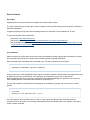
The Security Manager is responsable of restricting unauthorized access to the different OpenNaaS resources. It
uses a set of rules defined by the NOC to specify which actions the user can launch over an specific resource (for
example, a router). The architecture of the security module is the following:
The user logs in to the application through some Front End. Inside this Frond End there's a login module, which
establishes a communication with an ID provider in order to confirm the user authenticity. If the ID provider can
ensure the user authenticity, it sends a token to the Front End that will be used in all the future queries of the user to
OpenNaaS server.
The Front End attaches this token to the query and redirects it to the OpenNaaS Remote API.This token is used by
OpennNaaS to pass a credential process, implemented by the authorization module. It's based on a multivel
delegation of rights over resources. For each incoming query, the authorization module checks if the specified user
is allowed to execute the action on the resource he/she is requesting. Only if the query + token combination matches
an allowed method stored at the database, the action will be added to the resource queue. Authorized queries are
defined in the Access Control List (ACL), which stores the relation between a user, an action, a resource and a
permission rule.
User Interfaces
Most of OpenNaaS components offer some entry points used to interact with them. This is the case of
ResourceManager and ProtocolSessionManager, but also the one for each active capability.
In OpenNaaS there are two main type of entry points:
the ones accessible through the local server console
the remote ones, based on web services and grouped in the remote API.
Most of OpenNaaS components are available through both the server console and the remote API, although
available operations may differ.
Server Console
Karaf shell
OpenNaaS server uses a Karaf shell to manage Fuse and the OSGi container.
The shell is local to the server (although it can be configured to be acceded remotely) and is the primary interface to
administer OpenNaaS.
It supports scripting, among many other interesting features you would like to take advantage of, for sure
To get more information about karaf itself:
Karaf shell - http://karaf.apache.org/
Karaf user's guide - http://karaf.apache.org/manual/latest-2.2.x/users-guide/index.html
Karaf complete list commands: https://cwiki.apache.org/KARAF/41-console-and-commands.html#4.1.Consol
eandCommands-OSGishell
CLI commands
Karaf command line console offers a set of pre-defined commands to manage osgi bundles and features, but it has
been extended by exporting other customized commands required to operate OpenNaaS.
Each command has a namespace and a command name. The way to invoke them is as follows:
>namespace:commandname [options] arguments
As a quick reference, each OpenNaaS module exports commands required to interact with it. Namespaces are used
to identify the context of a command or, more precisely, the component it comes from. In this manner,
ResourceManager defines the "resources" namespace, ProtocolSessionManager the "protocols" one, and so on.
Each capability defines a namespace that identifies its functionality, too.
The list of all available commands (and its namespaces) is accessible by pressing "tab" key twice form a clean
prompt:
>[tab tab]
>Display all 341 possibilities? (y or n)
For a description of the commands, each one has a "--help" option that describes the command syntax, its
semantics and how to invoke it, enumerating required arguments and available options. An example of this option
output is shown just below:
>resource:list --help
DESCRIPTION
resource:list
List all resources in the platform
SYNTAX
resource:list [options]
OPTIONS
--help
Display this help message
--all, -a
Extensive version
--type, -t
Specifies the type of resources to list (if specified, only
resources of this type will be listed)
If you are having problems using the shell, please refer to Getting Support section.
Remote API
For accessing OpenNaaS functionalities remotely the system exports the OSGI services through RESTful web
services.
Distributed OSGI has been used for the integration of REST in the OpenNaaS platform. DOSGi allows integrating
REST or SOAP technologies with OSGi allowing dynamic registration of resources, capabilities and other services
as a web service.
When a resource is created, for example, all its capabilities are published dynamically to access remotely.
Each capability of each resource has its own web service and its own URL to access it.
The future security layer should control access to different capabilities according to the resource that is running.
Known clients
This page (and its child) contains information about software that uses the OpenNaaS via its remoting interface in
order to perform some action and/or integrate it with additional middleware.
Please also check the /clients folder on the latest OpenNaaS distribution for the latests updates:
https://github.com/dana-i2cat/opennaas/tree/develop/clients
Feature Overview
Router configuration
Support of different models of router (Juniper M10, M20, M7i).
Support of logical routers including creation, modifications and deletion.
Configuration of physical interfaces.
Support of logical interfaces, including creation, modifications and deletion.
Compatibility with IPv6. Although IPv6 not implemented yet.
Resources management
Manage virtualized routers and IP networks.
Logical IP Networks
Permits the creation of logical IP networks as resources which are formed using virtual routers.
IPv6 networks compatibility.
Allows configuration of routing protocols on a per network basis (e.g. OSPF)
The complete list of supported resources and their capabilities is available at this section.
Supported resources, capabilities and drivers
As stated in system architecture section, OpenNaaS supports different types of resources, and it can be extended to
support other ones.A resource is the representation of a device in the software, and it is associated to a set of
features which are represented as capability components. Capabilities are designed per resource type and are
loaded for a particular resource if the ResourceDescriptor says to. However, most capabilities require a driver to
interact with a real device and perform their actions. Hence, there is a relationship between resource types,
capabilities and drivers which determines what kind of operations can be done with OpenNaaS to which specific
network devices.
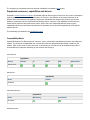
This relationship is illustrated in the compatibility matrix
Compatibility Matrix
OpenNaaS supports five different types of resources: router, optical switch, bandwidth on demand, mac bridge and
network. The resources are abstracted from concrete devices and technologies/vendor details, except from the
network, which involve a set of router resources. In this section you can find a list of all available drivers and the
functionalities they implement depending on the resource they belong to.
Router Resource
Capabilities
Drivers
Chassis
IP
OSPF
GRE
Junos 10.10
BoD Resource
Capabilities
Driver
L2BoD
Autobahn
Optical Switch Resource
Capabilities
Driver
W-onesys
Mac Bridge Resource
Monitoring
Connection
Static Route
Capabilities
Driver
VLAN-Aware Bridge
IOS
Deploy and run OpenNaaS
System requirements
OpenNaaS is tested to both build and run in:
Windows 7
Linux system (Ubuntu +10.10 and Debian)
Although not tested, there is no reason to believe OpenNaaS should not be able to run in other systems.
Build only
Note that you will need internet connectivity for the build too, as the dependencies are fetched
during build by Maven.
Run OpenNaaS
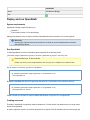
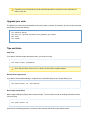
To start OpenNaaS, launch the executable named opennaas in the following folder:
/platform/target/opennaas-${project.version}/opennaas-${project.version}/bin
Notice that there is a .sh and a .bat file.
Please use .bat if you are using Windows, and .sh if you are in a GNU-Linux or Mac OS box.
So, for version 0.10 on linux, you will run it as follows:
cd opennaas/platform/target/opennaas-0.10/opennaas-0.10/
./bin/opennaas.sh
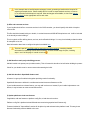
By default, OpenNaaS will open a CLI prompt on the terminal. To avoid this you can execute it this way:
cd opennaas/platform/target/opennaas-0.10/opennaas-0.10/
./bin/opennaas.sh server
Please note that you will have to configure Karaf's SSH daemon to login the CLI via regular SSH.
Creating resources
First step in OpenNaaS is registering existing infrastructure. For this tutorial, let's assume there is a single router
device to be registered.
In order to register a resource, a resource descriptor file is required. This file describes resource device type and
name, all capabilities OpenNaaS should load for it, and what drivers will it use. More information about the Resource
descriptor concept is available in System Architecture section.
A descriptor from the project examples directory, or a custom one can be used.
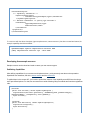
The CLI command to register a device with this descriptor will be:
resource:create /path/to/descriptor/resource.descriptor
Note: For this guide, we used a router descriptor, specifying junos20 as name.
Registering protocol contexts
Each resource can use many different protocols to communicate with the physical device it represents. Required
protocols are determined by the driver in use. For a resource to be able to use a required protocol, a Protocol
Context is needed. Protocol Context stores all required information to communicate with the device using a protocol
known to OpenNaaS.
In this example we're going to use netconf protocol. Hence, we introduce all netconf Protocol Context required data:
protocol type
authentication type
uri
authentication parameters
The following command illustrates how to register a protocol context for our resource using password authentication:
protocols:context router:junos20 netconf password
ssh://myuser:[email protected]:22/netconf
and the following, using key authentication:
protocols:context router:junos20 netconf publickey
ssh://[email protected]/netconf privateKeyPath {key-passphrase}
Notice that only one context per protocol type is registered in a resource. Last one lasts.
Starting resources
A resource will populate its model and enable all its capabilities when started. Hence, in order to operate with it
using opennaas, it must be started.
To start it, we use the following command:
resource:start router:junos20
Doing operations with resources
A resource includes a set of capabilities or features. These capabilities determine the set of available operations for
this resource.
OpenNaaS supported capabilities are specified in this section.
Please, remember that capabilities to load for a particular resource are specified in the resource descriptor.
Removing resources
Finally, if the resource isn't needed anymore, it can be stopped and removed. First, we stop it:
resource:stop router:junos20
The resource will deactivate all its capabilities and it will be reset. After, we'll destroy it and delete any resource
information in OpenNaaS.
resource:remove router:junos20
Notice that stopping and removing a resource causes no changes in real device configuration
(e.g. resource:remove router:logicalrouter1 does not delete the logical router, but only removes it
from OpenNaaS.)
Getting support
Users feedback is key to OpenNaaS success. That's why we put much effort in having a good documentation and
several channels to help users solve their doubts, communicate their needs and report errors. This page offers an
overview these channels.
FAQ
Frequently asked questions are being gathered in FAQ section. This should be the first place to look in when facing
usage problems or issues that might have already been reported.
Mailing lists
OpenNaaS has a mailing list which provide support and feedback for problems. The mailing list is a good starting
point for understanding design ideas and key concepts used in the OpenNaaS implementation, and also for
collaborations. If you have feedback or feature requests we would love to hear them!
Check out pointers to mailing lists here:
http://www.opennaas.org/community
Issue tracker
OpenNaaS has an issue tracker, accessible at http://jira.i2cat.net:8080. There you can check for already reported
issues and find solutions to them.
Error reporting
If you have found an error in OpenNaaS software, or an unexpected behaviour that looks like an error to you, please
don't hesitate to report it.
In order to help the development team to reproduce the error, please include following
information in the error report:
Description of the error or undesired behaviour.
Shell history file or script to reproduce the error. Shell history is placed in
${usr_home}/.karaf/karaf.history in the server
Support files used in the script (e.g. resource descriptors)
A zip with OpenNaaS log files. Log files are placed in ${opennaas-path}/data/log/ folder in
the server.
Issue tracker registered users can create bug tickets to report the error, attaching collected information.
While we work out public access to the issue tracker, non registered users can use mailing lists for reporting. If you
are becoming an active participant or plan to report periodically, consider to ask for issue tracker registration in our
mailing list.
Remote support
In case we can not reproduce a bug, then remote access to your OpenNaaS installation may be needed. You can
check this tutorial as base material to enable remote access.
Frequently Asked Questions
1) When creating a new protocol session, it fails with a Configuration Error.
It's likely the context for the given protocol doesn't contain enough information for a session to be created, or it's just
wrong. Use the protocols:context command to register a context with corrected information. Check that the URI
contains the user/password, host, schema, etc... Concrete context information, however, depends on the underlying
protocol implementation.
2) When trying to start a new resource, it fails with the following error: "The subsystem request failed".
The netconf subsystem for ssh connections is not set in the router. You can find the problem description and it
solution at http://jira.i2cat.net:8080/browse/OPENNAAS-238
3) When building OpenNaaS, the build randomly fails with a: java.lang.OutOfMemoryError: PermGen space
This is due to the space that the JVM devotes to loaded classes running out. The reason for this is probably some
uncleaned reference on a ClassLoader that prevents the GC to do its job.The temporary workaround is to prepend
this to the maven calls:
MAVEN_OPTS="-Xmx512m -XX:MaxPermSize=128m" mvn install
Related to known bug: jira.i2cat.net/browse/OPENNAAS-417
4) When executing OpenNaaS platform, I only see 175 available commands.
None of the bundles are being loaded. There are several reasons why this might happen. In this case, we
recommend you to report your situation using our bug reporting system, by creating a ticket in the following link: http:
//jira.i2cat.net:8080/secure/CreateIssue!default.jspa
It will be very helpful for the developer team if you attach the log in the ticket. You can find them at platform/target/
opennaas-{version}/opennaa-{version}/data/log/
5) What are the system requirements for running OpenNaaS?
We have successfully tested OpenNaaS in Windows 7, Ubuntu and MAC OSX systems. There's a limitation by
using Windows XP. The reason is that OpenNaaS uses Fuse 4.4 version, which requires at least either a Windows
2003 Server, a Windows 2008 Server or Windows 7, in case you're using a Microsoft OS.
Developers Guide
Build the project
Get the source code
To get the code, you will need the git application and the git address for the code. We recommend you to follow this
guide in github. The guide also includes how to get the git tool installed in your system.
Once git is configured in your system, you can get the source code. OpenNaaS code is available as a github
repository at:
https://github.com/dana-i2cat/opennaas
To download the code, just run the following command.
git clone https://github.com/dana-i2cat/opennaas.git
Releases
By default, git will clone the master branch only. This branch contains the latest stable release of OpenNaaS. You
can get the development branch (highly unstable), which is named "develop". Alternatively, you can stick to a given
release from master.
Master contains the latest release, and older releases are tagged so you can get the release from the tag, by
launching the following git command:
git checkout <tag_name>
So, in order to fetch the development version (you should always do this if you plan to contribute code) you need to:
git checkout develop
Build requirements
OpenNaaS is build using Maven and Java. You will need:
Java SDK 1.6. http://www.oracle.com/technetwork/java/javase/downloads/index.html
Apache-maven 3.* http://maven.apache.org/download.html
Maven is available for most of platforms. You only need to decompress the project in a folder and configure your
terminal by setting of the path variable. Different binary releases will be published in the web. However, any version
of the source code can be downloaded from the code repository.
Also you will need Netconf4j if you are willing to develop OpenNaaS. It's a spin-off of Manticore 2 and Mantychore
projects that serves as a netconf client but also provides mock transport that is used in OpenNaaS tests. Feel free to
get it and play with it. If you only need to build opennaas, maven will fetch it for you.
Netconf4j resides in github, too. Go to the directory you
want to install it and run the following commands:
git clone https://github.com/dana-i2cat/netconf4j
cd netconf4j/
mvn clean install
Build the project
Once you've installed all required software, and also downloaded OpenNaaS source code, you can start the building
process . Go to OpenNaaS directory and execute the next command.
mvn clean install
This will cause maven to download all required dependencies, install them to your local repository and build our
application.
Populating your local repository with all required dependencies may take its time, especially the
first time you do it.
Upgrade your code
To upgrade your code to the last released version (last version in master, in this case), you can use pull command
from master (or any other branch):
git
git
mvn
mvn
checkout master
pull git://github.com/dana-i2cat/opennaas.git master
clean
install
Tips and tricks
Skip Tests
If you want to build the project but skip the tests, you can do so using
mvn clean install -DskipTests
Given flag will cause maven not to run tests, but tests will be compiled anyway.
Resume from a given point
If you want to build artifacts starting in a specific one (useful after fixing an error in that artifact), use:
mvn clean install -rf :<artifactId>
Do not stop at first failure
Maven stops building the project when a tests suite fails. To force maven to keep on building and testing use the
"fail never" flag:
mvn clean install -fn
At the end of the building process, a summary of the execution will show you per artifact results.
Adding memory to maven
Depending on your system specifications, you may need to increase the amount of memory maven can use to
compile the project.
Typical related errors are:
Java heap space
PermGen space
Apache Maven project has this web that may help to solve the problem.
How to create a new bundle
Steps to activate a bundle
In order for a bundle to be active in the shell:
1) Create bundle
A bundle is a group of Java classes and additional resources equipped with a detailed manifest file on all its
contents, as well as additional services needed to give the included group of Java classes more sophisticated
behaviors. Bundles are managed within an OSGi container.
From the developer point of view, a bundle is a project, with an associated pom.xml file. That pom.xml contains
instructions for maven and its plug-ins (typically maven-bundle-plugin) to build the project as a bundle. That means,
creating the artifact with its associated manifest.
If the building of a bundle succeeds, typically a jar file is created, containing compiled classes, the bundle
MANIFEST.MF and other resources (e.g. the blueprint core.xml file from step 2).
It is important to check that MANIFEST.MF has an "Export-Package" section with all packages this bundle offers to
other bundles. In the same way, a section named "Export-Service" tells the container what services are offered.
Instruction for maven to build the manifest are given in the pom-xml file, through maven-bundle-plugin. More
information on that plug-in is available on its website.
A bundle can be manually created (create required folders and files, edit pom.xml...) but there are tools that can do
that for us. With karaf archetypes a bundle is generated automatically from the following information:
mvn archetype:generate \
-DarchetypeGroupId=org.apache.karaf.archetypes \
-DarchetypeArtifactId=karaf-blueprint-archetype \
-DarchetypeVersion=2.2.5 \
-DgroupId=com.mycompany \
-DartifactId=com.mycompany.blueprint \
-Dversion=1.0-SNAPSHOT \
-Dpackage=com.mycompany.blueprint
In the example above, karaf-blueprint-archetype is used, generating a bundle with a blueprint file
exporting a sample service. Please modify this file in order to export desired services, or remove
it if no interaction with blueprint is required. Other archetypes are available, so check the Apache
Karaf website for the appropriate one for each case.
2) Offer and consume services.
If your bundle should offer or consume services in the OSGi container, you should specify this within a blueprint
core.xml file.
This file should be located inside your bundle, in src/main/resources/OSGI-INF/blueprint/core.xml. It will be included
in the bundle jar when building it.
This is a typical xml file defining beans, services, and notification bindings. You may check already existent bundles
for examples on its use.
More information about how to configure blueprint is available here.
This link is part of Fuse ESB guide for deploying into OSGi container containing detailed
information on interacting with the OSGi container. It covers a wide range of topics, including
steps 1 and 2 of this page. It is worth to look at
.
3) Add bundle to main project building process.
Add this bundle to its parent pom (modules section). This will cause this bundle to be build when building the parent.
Check for your bundle name in maven reactor when starting the build.
4) Add this bundle in OpenNaaS features.xml.
A feature is a group of bundles tied together providing certain functionality.
OpenNaaS features are defined in core/features/src/main/resources/features.xml file.
If your bundle extends an existent feature, you may add it to that one. Instead, if your bundle implements a new
feature, it may be better to create a new feature with it.
5) Update platform to load new features.
If applicable, add new features to platform config file, to load them at boot time.
Platform config file is platform/src/main/filtered-resources/etc/org.apache.karaf.features.cfg.
Features included in "featuresBoot" section will be picked up and activated when platform loads. This way, those
features functionality will be available to the user.
Please, check the feature your bundle belongs is included here.
6) Check all is correct
After building the whole project (or just your bundle, features and platform), when running the platform shell if you
execute osgi:list command it should list the bundle among all the rest.
If it offers services using blueprint. Blueprint column for your bundle should display "Active".
References
Interesting references about pom files and OSGi bundles:
[Introduction to the POM] http://maven.apache.org/guides/introduction/introduction-to-the-pom.html
[POM reference] http://maven.apache.org/pom.html
[Bundle Plugin for Maven] http://felix.apache.org/site/apache-felix-maven-bundle-plugin-bnd.html
[How to build OSGi bundles] http://wso2.org/library/tutorials/develop-osgi-bundles-using-maven-bundle-plu
gin#Exporting%20packages
How to create a resource
In order to illustrate how to create a resource, a sample resource bundle has been created.
Sample Resource
Sample resource is an example included in the source code, with very simple functionality.
A sample resource has only one available capability, called "example" with a single "sayHello" operation. We
strongly recommend to read the readme file and navigate the code to get familiar with it.
Using sample resource
When launching OpenNaas, the Sample Resource bundle is loaded, as can be seen with the list command:
OpenNaaS>list
[147] [Active] [Created] [ ] [60] OpenNaaS :: Sample Resource (0.12.0.SNAPSHOT)
Having this bundle activated allows OpenNaaS to operate with resources of this type.
To create a resource, a resource descriptor is required. There is a sample resource descriptor
in opennaas/utils/examples/descriptors
<resourceDescriptor>
<!-- Capability information -->
<capabilityDescriptors>
<information><type>example</type></information>
</capabilityDescriptors>
<!-- Resource information. It specify type and name-->
<information>
<type>sampleresource</type>
<name>resource1</name>
</information>
<properties/>
</resourceDescriptor>
If a resource with the above descriptor (type=sampleresource, name=resource1) has been created and started, its
example capability should be available:
OpenNaaS>example:sayhello sampleresource:resource1 Adam
[INFO] sampleresource:resource1 says : Hello Adam
Developing from sample resource
Sample resource can be cloned and used to create your own resource types.
Publishing Capabilities
After defining capabilities for your resource and implement them, you'd commonly want them to be exported to
OpenNaaS user interfaces, that is the server console and the remote API.
To publish them in the remote API, you'll need to publish the instance of the capability as an OSGi service using a
set of pre-defined options. For that, we recommend to override following lifecycle methods and introduce registration
calls:
@Override
public void activate() throws CapabilityException {
registerService(Activator.getContext(), CAPABILITY_TYPE, getResourceType(),
getResourceName(), IIPCapability.class.getName());
super.activate();
}
@Override
public void deactivate() throws CapabilityException {
registration.unregister();
super.deactivate();
}
To make your capabilities available through the server console, you'll need to craft you own commands and publish
them as OSGi services for Karaf shell to find them. ExampleCommand will serve you as an implementation guide.
For publishing them, please refer to sample resource blueprint file. To know more about this file, there is a guide to
publishing OSGi services that can be found here.
Putting things together
A part from capabilities, other components must be registered as OSGi services in order to interact with OpenNaaS
platform. This is the case of resource repository and bootstrapper, and also any driver you may need. All these
components are registered using blueprint configuration file in the bundle they belong to. Again, check sample
resource blueprint file.
Drivers will be commonly placed in a different bundle from the resource one. Please, don't forget to register them as
OSGi services (a new blueprint file will do the work). Although sample resource has no drivers, you can check junos
one for an example.
Resources, capabilities and drivers
Drivers
Junos 10 router driver
Protocols
Uses netconf protocol to communicate with the physical router.
Netconf4j is the library providing netconf protocol.
Actions are responsible for creating required RPC commands and parsing its response, when necessary.
Mapping Junos configuration to router model
Apache digester 2.1 is used to parse junos configuration xml and create a router model with its data.
Apache Velocity is used to craft netconf rpc commands to change Junos configuration.
RouterID details
Description
How it is modeled
Router ID must be set in every RouteCalculationService of the router model. That includes OSPF and BGP among
others.
Releases
Available release announcements
Starting at release 0.9, release announcements will be done in http://www.opennaas.org under the tag "release":
http://www.opennaas.org/tag/release/
This page will no longer host newer announcements.
For the older ones, you have the links just below.
Releases
No content found for label(s) release.
Mantychore 0.1
Date: 29/7/2011
Releases Notes - Mantychore - Version 0.1
The Mantychore developer team is proud to announce the Mantychore 0.1 Release. This is an early beta release,
the functionality is minimal (see below) but will be useful to test the deployment experience and the feedback cycle.
Mantychore will follow the Infrastructure as a Service (IAAS) paradigm to enable National Research and Education
Networks (NRENs) and other e-Infrastructure providers to enhance their service portfolio by building and deploying
software and tools to provide infrastructure resources like routers, switches, optical devices, and IP networks as a
service to virtual research communities.
The key features of Mantychore 0.1 include
Initial support for management of resources. Create, start, stop and remove operations are supported.
Support to list and set interfaces.
Support for CLI (Karaf gogo based shell).
Support for resource profiles
Support for JunOS (>10.10) systems with Netconf protocol enabled.
Persistence support.
Remote access to debug and fix errors.
Downloads
Linux (tar.gz) - mantychore-0.1.tar.gz
Windows (zip) - mantychore-0.1.zip
Installing
Please read our wiki page: deploying Mantychore
Compiling
You can also find the source code here:
http://svn.i2cat.net/repos/manticore/release/0.1/
and compile it youself. Please go to get the source code and build it for concrete instructions.
Documentation and user support
Please check our documentation here. Especially important for this release are the Getting started and System
Architecture sections.
Don't hesitate to contact us at the mantychore-technical mailing list.
Bug reporting
Mantychore FP7 project members can issue a bug ticket directly at:
http://jira.i2cat.net:8080/secure/CreateIssue\!default.jspa\|http://jira.i2cat.net:8080/secure/CreateIssue\!default.jspa
(http://jira.i2cat.net:8080/secure/CreateIssue\!default.jspa)
However, it doesn't allows for anonymous access yet. While we sort this out, feedback will be handled in the mailing
list.
Mantychore 0.4
Releases Notes - Mantychore - Version 0.4
This release of Mantychore is based off of the Karaf 2.2 series and it represents an important update in Mantychore.
It includes the necessary features to manage logical routers and configure subinterfaces. It is added support of two
type of encapsulation: vlan and ethernet. Finally, There were a set of bugs and needed improvements which
Mantychore has implemented.
OPENNAAS-2 - Create logical routers
OPENNAAS-23 - Set a description on an interface
OPENNAAS-30 - Fix problem to use configure interface action
OPENNAAS-43 - Refactorize helpers, Mantychore to OpenNaaS
OPENNAAS-81 - Network resource support in Mantychore
OPENNAAS-47 - Update capability to permit model
OPENNAAS-96 - Remove --refresh option in karaf commands
Dependency upgrade
Updated first tests to Pax-Exam 2.3
Updated Fuse to 2.4.0-fuse-00-27
Updated Apache Karaf to 2.2.2
Updated Maven to 3.0
Improvement
OPENNAAS-44 - Move one Mantychore test from Pax-exam 1.x to 2.3
OPENNAAS-85 - Lock | Unlock actions
Task
OPENNAAS-90 - Check spelling in all karaf commands
Downloads
Linux (tar.gz) - opennaas-0.4.tar.gz (101 MB)
Windows (zip) - opennaas-0.4.zip
(102 MB)
Installing
Please read our wiki page: deploying Mantychore
Compiling
You can also find the source code here:
http://svn.i2cat.net/repos/manticore/release/sprint_0_4/
and compile it youself. Please go to get the source code and build it for concrete instructions.
In this Sprint, the Mantychore source code has disable some modules (testing modules) in order
to refactorize in the next sprint. For these reason, these modules are not compiled
Some machines can need more memory to compile Mantychore, check this link if it is your case
Documentation and user support
Please check our documentation here. Especially important for this release are the Getting started and System
Architecture sections.
Don't hesitate to contact us at the mantychore-technical mailing list.
Bug reporting
Mantychore FP7 project members can issue a bug ticket directly at:
http://jira.i2cat.net:8080/secure/CreateIssue\!default.jspa\ (http://jira.i2cat.net:8080/secure/CreateIssue\!default.jspa)
However, it doesn't allows for anonymous access yet. While we sort this out, feedback will be handled in the mailing
list.
Mantychore 0.5
Mantychore - Version Mantychore 0.5 sprint
This Mantychore release aims to stabilize the Mantychore software. For this reason, the main tasks have the
objective to refactore the necessary tests and include new features to work with Mantychore. Moreover, it has added
the first design for the network supporting and parsing of XML-NDL messages.
OPENNAAS-57 - Support addResourceToNetwork feature
OPENNAAS-58 - Support deleteResourceToNetwork feature
OPENNAAS-59 - Create add/delete resourceToNetwork karaf command
OPENNAAS-60 - List ResourceToNetwork Karaf Command
OPENNAAS-141 - create mappings java to RDF-XML
OPENNAAS-143 - create export model command
OPENNAAS-147 - test java2ndl mappings
Improvements
OPENNAAS-126 - CLI - Clear CLI prompt
OPENNAAS-131 - CLI - remove separator lines
OPENNAAS-118 - Reformat netconf messages
Bug
OPENNAAS-160 - Mantychore assembly does not include mantychore features and repo
OPENNAAS-149 - Make sprint0_2 tests pass
OPENNAAS-150 - Make sprint0_3 tests pass
OPENNAAS-151 - Make sprint0_4 tests pass
OPENNAAS-152 - Make week26 tests pass
OPENNAAS-153 - Make nexus.resources integration tests pass
OPENNAAS-154 - Make net.i2cat.mantychore.tests.capability integration tests pass
OPENNAAS-155 - Make net.i2cat.mantychore.tests.commandsKaraf integration tests pass
OPENNAAS-156 - Make net.i2cat.luminis.tests.repository integration tests pass
OPENNAAS-157 - Make net.i2cat.luminis.tests.commandsKaraf integration tests pass
OPENNAAS-158 - Make commented tests pass
Dependency upgrade
Moved some tests to Opennaas
Downloads
Linux (tar.gz) - opennaas-0.5-bin.tar.gz (101 MB)
Windows (zip) - opennaas-0.5-bin.zip (102 MB)
Installing
Please read our wiki page: deploying Mantychore
Compiling
You can also find the source code here:
http://svn.i2cat.net/repos/manticore/release/sprint_0_5/
and compile it youself. Please go to get the source code and build it for concrete instructions.
Some machines can need more memory to compile Mantychore, check this link if it is your case
Documentation and user support
Please check our documentation here. Specially important for this release is the documentation regarding networks
(not yet updated).
If you are new to Mantychore we recommend you to read the Getting started and System Architecture sections.
Don't hesitate to contact us at the mantychore-technical mailing list.
Bug reporting
Mantychore FP7 project members can issue a bug ticket directly at:
http://jira.i2cat.net:8080/secure/CreateIssue\!default.jspa\ (http://jira.i2cat.net:8080/secure/CreateIssue\!default.jspa)
However, it doesn't allows for anonymous access yet. While we sort this out, feedback will be handled in the mailing
list.
Mantychore 0.6
Mantychore - Version Mantychore 0.6 sprint
Release Notes - Mantychore 0.6 sprint
This release mainly adds support for a BoD (Bandwith on Demand) resource and increases network functionality by
adding attach/detach interfaces feature. From the internal point of view, some bugs has been solved and network
model has been extended to store references to other resources.
The complete list of changes is as follows:
Bug
[OPENNAAS-161] - Mantychore platform is unable to load Mantychore features due to incorrect features file
name (when generated from project root)
[OPENNAAS-170] - Bad use of Properties in Events
[OPENNAAS-183] - Problem to execute BoD Tests: FileNotFound paxexam.lock
Improvement
[OPENNAAS-165] - Add support for Bandwith on Demand (BoD) resource.
[OPENNAAS-166] - Add attach command to L2 network.
[OPENNAAS-180] - Remove Examples folder from OpenNaaS platform
Technical task
[OPENNAAS-167] - Create BoD repository
[OPENNAAS-168] - Create a L2BoD capability
[OPENNAAS-169] - Create BoD resource model
[OPENNAAS-171] - Create L2BoD capability ActionSet (dummy)
[OPENNAAS-174] - Define how network stores references to Resources
[OPENNAAS-179] - Integration test for a BoD resource
[OPENNAAS-181] - Create the Bootstrapper class for the BoD Repository
[OPENNAAS-182] - Add the shell commands to the L2BoD capability
[OPENNAAS-185] - Create Queue ActionSet for BoD resource
Known issues:
This release is affected by following known issues:
OPENNAAS-162
Fresh build throws java.util.NoSuchElementException
on Enter
OPENNAAS-164
Mantychore tests fails to resolve opennaas features
and bundles
OPENNAAS-176
CommandNotFound in integration tests
OPENNAAS-177
NDL parser fails to resolve interfaces names when
exporting.
OPENNAAS-184
Interfaces are duplicated in networkModel
Downloads
Linux (tar.gz) - opennaas-0.6-bin.tar.gz (101 MB)
Windows (zip) - opennaas-0.6-bin.zip (102 MB)
Installing
Please read our wiki page: deploying Mantychore
Compiling
You can also find the source code here:
http://svn.i2cat.net/repos/manticore/release/sprint_0_6/
and compile it youself. Please go to get the source code and build it for concrete instructions.
Some machines can need more memory to compile Mantychore, check this link if it is your case
Documentation and user support
Please check our documentation here. Specially important for this release is the documentation regarding network
and BoD resource (not yet updated).
If you are new to Mantychore we recommend you to read the Getting started and System Architecture sections.
Don't hesitate to contact us at the mantychore-technical mailing list.
Bug reporting
Mantychore FP7 project members can issue a bug ticket directly at:
http://jira.i2cat.net:8080/secure/CreateIssue\!default.jspa\ (http://jira.i2cat.net:8080/secure/CreateIssue\!default.jspa)
However, it doesn't allows for anonymous access yet. While we sort this out, feedback will be handled in the mailing
list.
Mantychore 0.8
Release Notes - Mantychore 0.8 sprint
This release extends the network resource with two capabilities (see stories) and fixes several bugs in the software.
Network capabilities are very basic, and they are likely to be improved in the near future. Concretely, queue has to
be designed and implemented to use a two-face commit pattern. An also stubby static-route capability has been
created for routers. It does not yet parse static routes information, but allows inserting static routes.
The sprint has been also dedicated to prepare the EC review demo. Hence, there are some technical tasks or
improvements related to it.
The complete list of changes is as follows:
Bug
[OPENNAAS-133] - LTs don't print its description
[OPENNAAS-162] - Fresh build throws java.util.NoSuchElementException on Enter
[OPENNAAS-164] - Mantychore tests fails to resolve opennaas features and bundles
[OPENNAAS-175] - Commands not displayed in karaf shell but present
[OPENNAAS-176] - CommandNotFound in integration tests
[OPENNAAS-177] - NDL parser fails to resolve interfaces names when exporting.
[OPENNAAS-224] - Resolve bugs reported by the users.
[OPENNAAS-226] - Queue response shows pending state when an action throws exception
[OPENNAAS-228] - Interfaces OperationalStatus is not set into model
[OPENNAAS-229] - ospf:configureInterfacesInArea only work with interfaces, but not with service endpoints
(like GRE)
[OPENNAAS-231] - Bug in Resource Lifecycle
[OPENNAAS-232] - NullPointerException adding a topology without NetworkDomain
[OPENNAAS-237] - Router capability error
[OPENNAAS-238] - Can't access to Myra and GSN in OpenNaaS
[OPENNAAS-239] - resource:start <logical system> does not appear to update model correctly
[OPENNAAS-242] - NullPointerException adding resource to network with topology
[OPENNAAS-245] - Wrong interface for GRE.
[OPENNAAS-248] - Every protocol accept different contexts
[OPENNAAS-249] - chassis:showInterfaces throws an Exception if there's no GRE configured on the device.
[OPENNAAS-254] - queue:remove with bad index shows Array index out of bounds
Improvement
[OPENNAAS-218] - Test GRE Tunnel between VMs and Lola
[OPENNAAS-219] - Update TNC script
[OPENNAAS-220] - Add testbed to OpenNaaS
[OPENNAAS-223] - Configure the VMs for the TNC demo.
[OPENNAAS-235] - Create a default static route in LR
[OPENNAAS-251] - Add descriptions to all resource descriptors.
[OPENNAAS-252] - DeleteTunnelAction should not delete the "unit" tag.
Story
[OPENNAAS-221] - Create Queue Capability in network
[OPENNAAS-222] - OSPF for the Network resource.
Technical task
[OPENNAAS-88] - Add router response message to queue.confirm action error messages
[OPENNAAS-134] - Rename mantychore packages with functional names.
[OPENNAAS-190] - Update demo script with demo topology
[OPENNAAS-230] - List interfaces and IPs that will be used in the EC and TNC demos.
Downloads
Linux (tar.gz) - opennaas-0.8.tar.gz (101 MB)
Windows (zip) - opennaas-0.8.zip (102 MB)
Installing
Please read our wiki page: deploying Mantychore
Compiling
You can also find the source code here:
https://github.com/dana-i2cat/opennaas
and compile it youself. Please go to get the source code and build it for concrete instructions.
Some machines can need more memory to compile Mantychore, check this link if it is your case
Documentation and user support
Please check our documentation here.
If you are new to Mantychore we recommend you to read the Getting started and System Architecture sections.
Don't hesitate to contact us at the mantychore-technical mailing list.
Bug reporting
Mantychore FP7 project members can issue a bug ticket directly at:
http://jira.i2cat.net:8080/secure/CreateIssue\!default.jspa\ (http://jira.i2cat.net:8080/secure/CreateIssue\!default.jspa)
However, it doesn't allows for anonymous access yet. While we sort this out, feedback will be handled in the mailing
list.
Mantychore 0.9
Release Notes - Mantychore 0.9 sprint
This release adds support for autobahn, creates a web service (ws) skeleton, and refactors all capabilities
interface so they are exportable through ws.
It also collapses some bundles and remove code duplication, mainly in tests, helpers, and mocks.
The complete list of changes is as follows:
Bug
[OPENNAAS-280] - Gave up waiting for service
Improvement
[OPENNAAS-305] - QueueManager Capability refactor
[OPENNAAS-307] - Pretask for WS: Merge pull requests for Model (with WS ) and itest
[OPENNAAS-308] - Upload to Github the CXF client, which is a separate maven project
Story
[OPENNAAS-284] - As a user I want to call a BoD service so that I can provision links
Technical task
[OPENNAAS-99] - Mov required helpers to OpenNaaS
[OPENNAAS-107] - Get rid of test helpers duplication
[OPENNAAS-258] - Deploy sample CXF service (prototype)
[OPENNAAS-273] - Implement WS facade
[OPENNAAS-276] - Re-structure capabilities design (ICapability, ICapabilityLifecycle, AbstractCapability,
functional interfaces)
[OPENNAAS-277] - Adapt each existing capability to new design and define its interface
[OPENNAAS-290] - export whole model in web services wsdl
[OPENNAAS-311] - QueueManager Capability refactor
[OPENNAAS-312] - 1-Merge pull requests for WS ,Model. 2-Pull request for itest and merge
[OPENNAAS-314] - Upload CXF client
Downloads
Linux - opennaas-0.9.tar.gz (101 Mb)
Windows - opennaas-0.9.zip (102Mb)
Installing
Please read our wiki page: deploying Mantychore
Compiling
You can also find the source code here:
https://github.com/dana-i2cat/opennaas
and compile it youself. Please go to get the source code and build it for concrete instructions.
Some machines can need more memory to compile Mantychore, check this link if it is your case
Documentation and user support
Please check our documentation here.
If you are new to Mantychore we recommend you to read the Getting started and System Architecture sections.
Don't hesitate to contact us at the mantychore-technical mailing list.
Bug reporting
Mantychore FP7 project members can issue a bug ticket directly at:
http://jira.i2cat.net:8080/secure/CreateIssue\!default.jspa\ (http://jira.i2cat.net:8080/secure/CreateIssue\!default.jspa)
However, it doesn't allows for anonymous access yet. While we sort this out, feedback will be handled in the mailing
list.