1
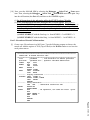
[10] Now, reset the MALAB SIM by selecting the Debugger Select Tool None menu item. Then, selecting the Debugger Select Tool MALB SIM menu item again. Step into the call function (the first call) and observe the STATUS register. (1) Do all instructions in the subroutine affect the STATUS register? Explain. (2) If not, indicated the instructions that affect the STATUS register. What value is stored in the STATUS register when the instructions that affect the STATUS register in the function call are executed? Write down the values of the five flags, Negative, Overflow, Zero, Digital Carry and Carry after the following instructions are executed and explain the reason. (a) DECF MYREG, F with the first loop, i.e. from MYREG = 3 to MYREG = 2: (b) DECF MYREG, F with the third loop, i.e. from MYREG = 1 to MYREG = 0: Part2 - Execution of Nested Call Instructions [1] Create a new file and name it as lab32.asm. Type the following program to observe the nested call. Add the register of TOS (Top-of-Stack) to the Watch window to see how the stack pointer moves. ;* ;****************************************************************** ; Lab32.asm: A nested function call. ;****************************************************************** list p=18F458 ; list directive to define processor #include <p18f458.inc> ; specific variable definitions COUNT EQU 0x07 MYREG EQU 0x08 ORG 0x000 MAIN MOVLW 0 MOVWF COUNT BACK CALL DISPLAY GOTO BACK ;-------- Display subroutine ------------------------------------DISPLAY INCF COUNT, F MOVFF COUNT, PORTB CALL DELAY RETURN ;-------- Delay subroutine --------------------------------------ORG 50H ; Subroutine started at 50H DELAY MOVLW 0x3 MOVWF MYREG AGAIN NOP ; No operation, but take one instr. cycle. NOP DECF MYREG, F BNZ AGAIN NOP RETURN END Page 26.1151.13