1
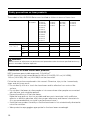
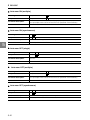
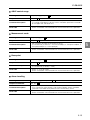
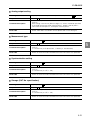
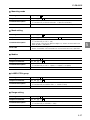
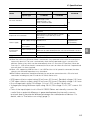
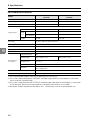
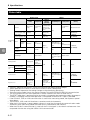
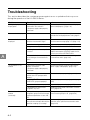
Problem
The binary output is not
output properly.
Possible Cause
Check the output circuit and wiring, and ensure
proper connection.
Is the logic properly set?
The LK-G5000 Series uses negative logic for
output.
Is the import timing properly set?
Use strobe output to enable importing with
proper timing. (page 4-15)
Is the binary selection input provided
properly?
Provide the input properly. (page 4-11)
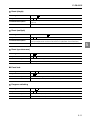
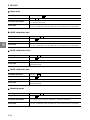
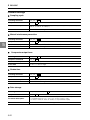
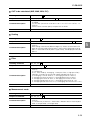
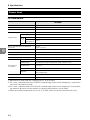
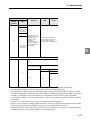
The RS-232C
Is the communication cable properly
communication is disabled. connected?
A
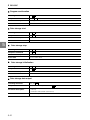
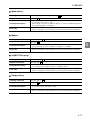
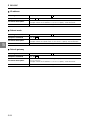
The operation key does not
work.
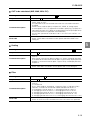
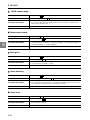
The LAN communication is
disabled.
Countermeasure
Is the wiring correct?
Connect the communication cable properly.
(page 5-4)
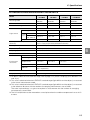
Is the communication cable
connected according to the
specifications?
Check the connection of the communication
cable. (page 5-4)
Are the communication parameters
properly set?
Set the same communication parameters
between the LK-G5000 Series and the external
device. (page 5-4)
Is the communication program
correct?
Check that the commands and delimiters are
sent and received properly.
(page 5-5)
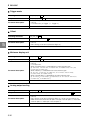
Is the setting correct for the
communication method and external
device?
Set the automatic transmission properly.
(page 3-72)
Is any item being set?
The communication is disabled during setting.
Is the display panel properly
connected?
Connect the display panel properly.
(page 1-26)
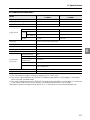
Is the panel lock set to ON?
Set the panel lock to OFF. (page 3-76)
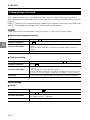
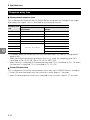
Are the IP address and subnet mask
properly set?
Adjust to the proper settings. (page 3-81)
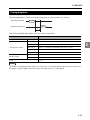
Is a cross cable used when the LKG5000 Series is directly connected
with a PC?
Use a cross cable for direct connection with a
PC.
Is the PC connected using one-to-one To establish LAN connection with a PC, use oneconnection or local connection?
to-one connection or local connection which
includes only the PC and the LK-G5000 Series
units.
A-4
A