1
SRM system – Reverse Auction (RA) Process for Supplier – User Manual
Step 5: Bidders will submit their Auction Response in the Price range provided within the deadline
time.
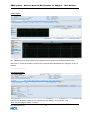
In the RA doc., Currency, Starting Price, Reference Price (last purchase price), Reserve Price (
Beyond which Auction Bid will not be considered for selection/not valid), Decrement value for
consecutive Bids are specified item-wise.
Step 6: Once the RA deadline time is reached, RA is closed for further Response submission.
Step 7: The best Response is accepted by Buyer & sent for further approval by his Manager.
Step 8: The approving manager can finally accept or Reject the Reverse Auction Response.
NOTE: The price which is finalised & accepted, can be used for Creating Contract or Purchase order
by HCL.
*
4. How to access the Reverse Auction document…..
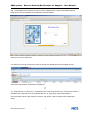
To access the RA document, supplier has to access the SRM Enterprise portal .
Select HCL SRM under GROUPSITES option and enter the Supplier Portal screen.
HCL Infosystems Ltd.
4