1
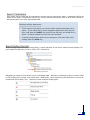
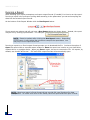
WebFOCUS Portal Report Parameters Each report has a unique set of parameters to select prior to running the report. Parameters define the scope of the report. Parameters may be in a variety of different formats, such as drop down menus or text boxes where you enter appropriate data. Selecting multiple parameters There may be times when you need to select multiple parameters for a report. If you would like to select contiguous parameters click the first item, hold down the SHIFT key and click the last item you would like to select. All items between the two items are selected. To select multiple items that are not contiguous, click each item while holding down the CTRL key. Report Output Format When viewing a report on the Content Node, a visiual indicator of the report output format displays. Report output formats may be Excel, HTML, PDF, PowerPoint. Outputting a report to Excel allows you to manipulate data. Whereas, outputting a report to either HTML or PDF allows you to simply view report data. Additionally, some reports may be delivered in comma delimited text file formats (.csv). Below are some example output types: 4