1
40
TUTORIAL
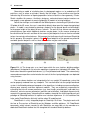
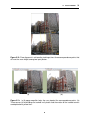
(a)
(b)
(c)
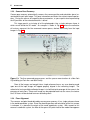
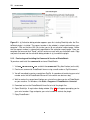
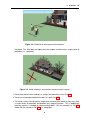
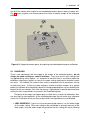
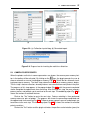
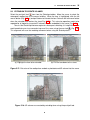
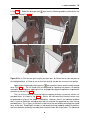
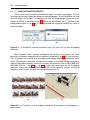
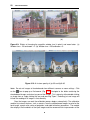
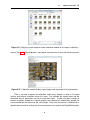
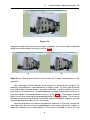
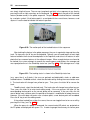
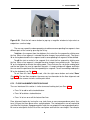
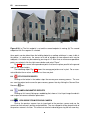
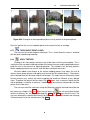
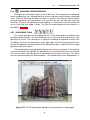
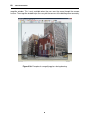
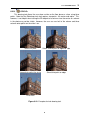
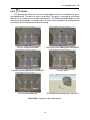
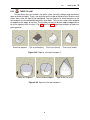
Figure 5.25: (a) Textured version of Fig. 5.24(d); Additional geometric elements added to the
roof as seen from (b) the camera frustum and (c) another view that lies outside the frustum.
The view in (c) illustrates the drawbacks with standard texture mapping in SketchUp, which
does not perform occlusion detection to prevent occluded faces from receiving projected texture. This problem is fixed with the advanced texture mapping feature in PhotoSketch.
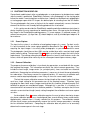
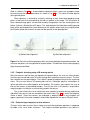
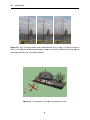
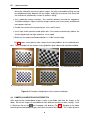
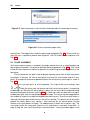
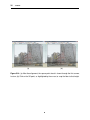
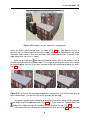
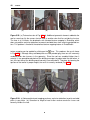
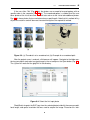
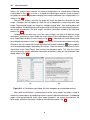
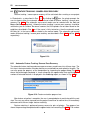
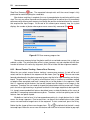
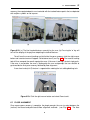
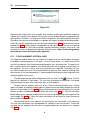
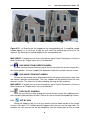
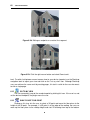
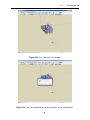
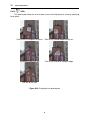
icon. This produces the result shown
texture mapping can be applied by clicking on the
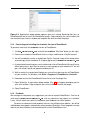
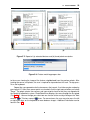
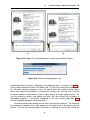
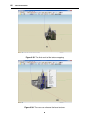
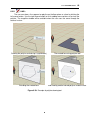
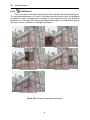
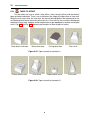
in Fig. 5.26(a). Although many occluded pixels are now painted gray, there are still incorrectly
rendered pixels due to errors in the geometry. Since the roof was modeled higher than it
actually is, the ground-based photo of the building manages to project onto the roof when, in
fact, the front face of the building would normally have occluded it. Therefore, by lowering the
top face of the roof to its proper height, the result is correctly rendered (Fig. 5.26(b).
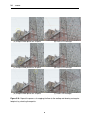
(a)
(b)
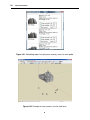
Figure 5.26: (a) Advanced textured mapping performs occlusion detection to paint occluded
pixels in gray color. (b) Correction to height of roof further resolves occlusion issues and
correctly renders the roof.
40