1
VComm User's Manual, V1.54
This object is very handy for voice transmission without having to use an intercom or radio's
PTT. When activated, it will in fact, disable the PTT. Sensitivity can be adjusted in real time
via the SENSE pin. A static data value called off delay, specifies the amount of time it takes
to deactivate the circuit after the audio input has dropped below the sensitivity level. This
keeps the circuit from turning off during short pauses in speech.
Object 2097 – VComm S/W VOX with Activity, implements the same functionality and it
also provides an output pin to indicate when the VOX circuit is active.
21 Converting Legacy Radios to Version 8
VComm legacy radios and intercoms have been discontinued. In their place, a new
generation of radios and intercoms has been introduced and is actively in use within
VComm. The following sections describe how to convert legacy radio designs to use current
VComm radio and intercom objects. For more detailed information on the specifics of the
new radios and intercom, refer to the VPLus Release Notes and the VPLus On-line Object
Help System.
21.1 The Legacy Radios
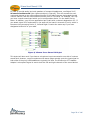
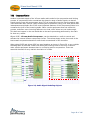
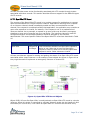
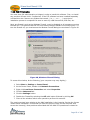
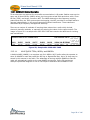
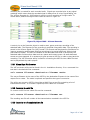
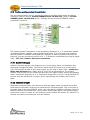
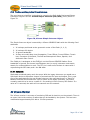
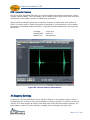
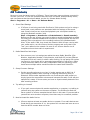
The legacy radios needed Split Audio Device and Stereo Connection objects to select a
sound card channel and connect the wave in and wave out streams to the network (see
Figure 75). These objects have been discontinued because they are just not needed as their
capabilities have been incorporated into the new radios.
Legacy
Radio
Network
Device
Audio
Device
Figure 75, Legacy Radio
Page 120 of 146