1
VComm User's Manual, V1.54
7.5.7
VComm Terrain Server
VComm 8.0 Build 331 and later versions include a terrain server interface to the VComm
Terrain Server (VTS) for calculating the effect of terrain. Default terrain data is provided in
DTED Level 0 format and is installed with the VTS option for the entire earth. Users can
elect to insert higher resolution DTED or DEM data. The VTS is a separately licensed
software product which can be purchased from SimPhonics. It is a standalone TCP/IP server
which can run on the same computer as V+ or a separate computer. VComm queries the
VTS as a TCP/IP client through a remote message protocol. The protocol is defined in the
VComm Signal Quality Service Specification. The VTS is described in the VComm Terrain
Server User Manual.
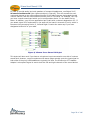
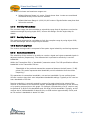
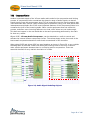
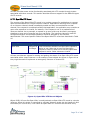
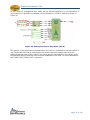
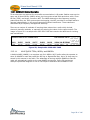
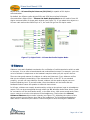
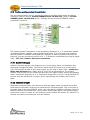
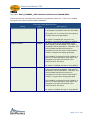
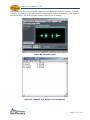
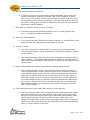
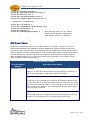
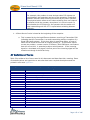
Figure 16 presents an example design with two radios where VComm has been configured
to run the VTS. In this example, Radio 2 is transmitting and Radio 1 is receiving. Note the -25.4 dBm attenuation due to terrain shown in Radio 1’s Radio Data Monitor object.
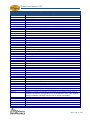
Figure 16, Example Design Using the VComm Terrain Server
At the bottom right of this example is a VComm Terrain Server Status object. It’s output
pin indicates a round trip latency of 0.001477 seconds (1.477 milliseconds) from the time
VComm sent the request to the time VComm received the attenuation value to and from the
VTS.
Note: This example is available in the VPLus Samples folder of V+, Build 331 and higher.
Page 37 of 146