1
Chapter 4 : Advanced Cross Stitching
other object. See Rotating objects and
Skewing objects using click and drag.
Resize image
2 In Picture mode, load a picture. See
Inserting bitmap images for details.
Transform image
3 In Design mode, click the Auto Stitch icon
Digitizing pictures automatically
Digitize the entire backdrop image
automatically using Auto Stitch. Alternatively,
using Magic Wand, you can create cross stitch
fills from colored sections of a picture.
and click the image.
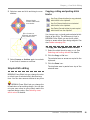
The Auto Stitch dialog opens.
Select thread chart
Select image
mapping method
Specify maximum colors
Select to omit
background color
Digitizing with Auto Stitch
Use Auto Stitch (Design toolbar) to automatically create cross stitch designs from pictures.
Digitize the entire backdrop image
automatically using Auto Stitch. You can
change the stitch type manually later as
required.
Tip You can also select blocks of color in your
picture to stitch using Magic Wand. See
Digitizing with Magic Wand for details.
To digitize with Auto Stitch
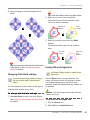
4 Select to map the picture colors to:
Current Palette: Only colors in the
current palette are used.
1 Prepare your image as necessary.
Use a third party paint program to clean up
the image.
BERNINA® Cross Stitch : Onscreen Manual
30