1
PowerEffects Version 2 User Manual
The editor options (such as bold, italics, underline, etc.) apply to the content you are editing in
the editor box. To apply bold to some text, for example, you would highlight the text you want to
bold, then click the B button for bold. The same goes for italics, underline, strike-through, font,
font size, color, and whether you want the text to be linkable or not.
The Insert Image button allows you to enter an image, and you’ll be prompted for the image
URL.
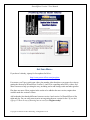
See the image above for a description of all the fields on this page. They should all be fairly selfexplanatory, but one merits special attention.
The Preview button (as opposed to the Preview This Frame button, which gives you a preview of
how that one frame of animation will look) opens up a new window, allowing to see your entire
animation as you’ve created it so far. It’s also where you’ll get the code and instructions on
where to paste the supplied code on your web page to generate your animation effect.
Animation Tips
Sometimes effects behave differently depending on what is before or after them. For
example, Appear will fade In if not already visible, or remain unchanged if already
visible. In other words, Appear is the same as doing nothing when it's already visible
(however, in preview mode it will always fade in on Appear).
Copyright © 2008 Street Muse Publishing. All Rights Reserved.
12