1
troubleshooting
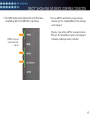
The DIRECTV CINEMA™ Connection Kit status lights can help you identify problems with your device. The information below
provides details regarding the various LED states and describes the meaning of each state.
LEDs for Successful Installation
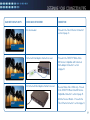
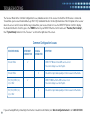
If you are experiencing technical difficulties with your DIRECTV CINEMA Connection Kit (DCCK) installation, please consult the Expected LED
Configuration table below to verify the expected state for each LED after a successful installation. Identify your connection type (top of the table)
and ensure the status of each LED on your device matches those below the corresponding connection type.
Expected LED Configuration
led labelethernet cable configurationcoaxialcableconfiguration
(as depicted on page 13)
(as depicted on page 17 & 20)
power
Solid Green
Solid Green
wlan
Solid Green
Solid Green
Activity
Flashing Green
Flashing Green
Coax Network
Off
Solid Green
AP/STA
Off
Off
29