1
directv® whole-home dvr service compatible connection
This section describes how to connect your DCCK device if you have a DIRECTV Whole-Home DVR service compatible installation.
In this installation, you will be using the enclosed coaxial cable. The Ethernet cable included with your DCCK will not be used.
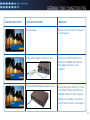
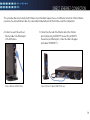
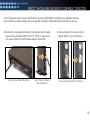
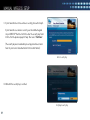
A. Disconnect the coaxial cable from the back of your Receiver, which should be
connected to the port labeled “SATELLITE IN 1” or “SAT IN 1.” and connect it
to the coaxial connector on your DCCK device labeled “Towards LNB”.
Disconnect Coaxial Cable from Receiver
Connect Coaxial to “Towards
LNB” on DCCK Device
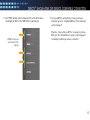
B. Unscrew the cap from the coaxial connector
labeled “SAT Rcvr” on your DCCK device.
Remove Cap from “SAT Rcvr” on DCCK Device
15