1
cloudingo.com
cloudingo
TM
Quick Start Guide
DASHBOARD & NAVIGATION
1
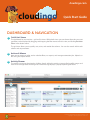
Grid & List Views
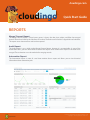
The dashboard has two versions - grid and list views. Within both views you can choose the order you want
your filters to be displayed by dragging and dropping the filter names in the list view, and clicking Re-Order
Filters in the Actions menu.
The grid view allows you to quickly sort, resize, and reorder the columns. You can also search within each
column and set parameters.
2
Actions & Menus
3
Activity Stream
Here you can create, re-order, and re-calculate filters, run reports, and manage automation jobs. Upload .csv
files using the Import Wizard.
The activity stream can be pinned or hidden. Search within the activity stream to find specific merges and
track when a merge failed. Hovering over a failed message displays a popup explaining the failure.
3
2
1
For more information visit www.cloudingo.com
copyright © 2015 Symphonic Source, Inc.