1
HomeRunner User Manual
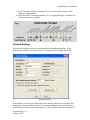
9. Click "Download Labels" to transfer all of your device names from the Web
Xpander to HomeRunner
10. From WinEVM, open Megacontroller, click "Logging Messages" and make sure
all relevant boxes are checked
Network Settings
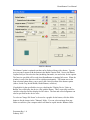
The Network Settings screen is accessed through the HomeRunner toolbar. If the
HomeRunner toolbar is not visible, press "T" to toggle between hidden and visible.
Network Settings
HomeRunner can store up to 5 different network settings which can be selected either
through the Network Settings screen or from actions assigned to user created buttons.
Each setting can be given an optional name (i.e. Home, Office) and must contain the IP
Document Rev. 1.0
February 2007