1
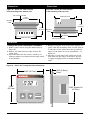
Dimensions
Dimensions
Figure 2a – Series 321 Timer inserted
in the mounting collar, bottom view.
Figure 2b – Series 321 Timer inserted
in the mounting collar, top view.
321 Timer Front Panel
3.325"
(85.46mm)
2.585" (65.7mm)
Mounting
Collar
1.750"
(44.5mm)
1.750"
(44.5mm)
Mounting
Collar
3.325"
(85.46mm)
2.585" (65.7mm)
321 Timer Front Panel
Installation
Through-the-Panel Installation Procedure:
1. Make a panel cutout using the dimensions in
Figure 2c.
2. Remove the timer from its collar and set the
collar aside.
3. Insert the timer into the cutout. Check to see
that the gasket is not twisted and is fully seated
in its channel.
4. While pressing the front of the timer against the
panel, slide the mounting collar over the back of
it. The tabs on the collar must line up with the
ridges on the timer for secure installation - see
Figure 1b.
5. The tabs on each side of the collar have teeth
that latch into the ridges of the timer. Be sure
to apply enough pressure to firmly install the
timer.
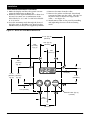
Figure 2c – Series 321 Through-the-Panel dimensions.
.250" (6.35mm)
Panel
2.585" (65.7mm)
321
2.585"
(65.7mm)
2.585" Square Cut
(65.7mm)
Time Set
Start
Stop
WATLOW Series 321 User's Manual
2