1
!
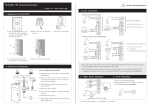
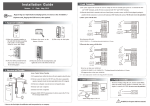
6. Wiegand Output
Warning: No operating with power on
7. Wiegand Input
The device supports standard Wiegand 26 output,
The device has the function of Wiegand signal input . It s upports to
as a reader device it has a very good compatibility.
connect with an independent card reader. They are installed each
side of the door, to control the lock and access together.
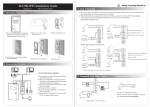
(2) RS485 Mode:
485+
485-
Please use specified RS485 wire, RS485 active converter and
bus-type wiring.
485+ 485-
Terminals:
+12V
485Access Control
12Vout
485+
GND
GND
IWD1
TXD
IWD0
DATA1
DATA1
DATA0
Terminals
PC Serial Ports
485+
RS485+
485-
RS485-
RS485 Bus
485+
485-
485+
485-
RS485
Converter
RLED
RXD
RLED
GND
DATA0
GND
GND
GLED
WD 0
BEEP
GLED
BEEP
(3) TCP/IP Mode:
WD 1
(1) Please keep the distance between the device and Access Control or Card Reader less than 90 meters(Please use
Wiegand signal extender in long distance or interference environment).
(2) To keep the stability of Wiegand signal, connect the device and the Access Control or Card Reader in same ‘GND’
in any case.
(A) Crossover cable: The device and PC connected
directly.
(B) Straight cable: The device and PC connected to
LAN/WAN through switch/Lanswitch.
PC
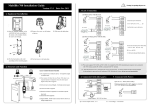
8.Other Functions
Switch
IP Address:192.168.1.100
Subnet Mask:255.255.255.0
(1) Manual Reset:
…
If the device does not work properly because of misoperation or
other abnormality, you can use ‘Reset’ function to restart it.
Side View
Back View
IP Address:192.168.1.124
Operation: Remove the black rubber cap, then stick the Reset button
Subnet Mask:255.255.255.0
hole with a sharp tool (the tip diameter less than 2mm).
(2) Recovery Factory Settings:
You can use the tamper switch to recovery factory setting, such
as device number, system password, IP address, RS485 address,
etc. More information please refers to the user manual.
10. Cautions:
Operation: Press the tamper switch three times after the alarm being
triggered 30 seconds but no more than 60 seconds.
Reset Button
Tamper Switch
Note: The user data won’t be cleared.
(1)Power cable is connected after all the other wiring. If the device is working abnormally, please shut down the power
first, then make the necessary check . Kindly reminds you that any hot-line work may damage the device, and
it is not included in the warranty.
(2)We recommend the 3A/12V DC Power supply. Please contact our technical staff for details.
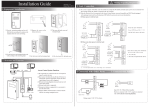
9. Communication
(3 )Please read the terminals description carefully and wiring by rule strictly. Any damage caused by improper
operations will not under warranty.
There are three modes that the PC software communicate
and exchange information with the device: RS232, RS485
and TCP/IP, and the last two mode support remote control.
(1) RS232 Mode:
(4)Keep the exposed part of wire less than 5mm, to avoid unexpected connection.
Terminals:
Terminals
PC Serial Ports
GND
RXD
Pin5-Gnd
Pin3-Txd
TXD
Pin2-Rxd
(5)Please connect the ‘GND’ before all the other wiring especially under the environment, to prevent the overlarge
instantaneous electrostatic to damage device.
(6)Do not change the cable type because of long distance between the power and the device.
(7) Please use specified RS485 wire, RS485 active converter and bus-type wiring.