1
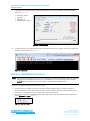
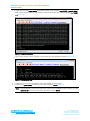
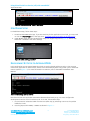
Using Virtual Serial Port Service (vSP) with smart BASIC Application Note 5. Configure the COM port with the port number seen in the device manager with the following settings (Figure 3): Baudrate – 9600 Stop Bits – 1 Data Bits – 8 Handshaking – None Figure 3: Comms Settings 6. Confirm that you can communicate with the development board by typing at and press enter. The module responds with 00 (Figure 4). Figure 4: Comms OK LOADING A SMART BASIC APPLICATION Note: When swapping between profiles on the same device, it may be necessary to clear any existing pairings on the module and iOS device. On the BL600, this can be done with the command at+btd*. On the iOS device, this can be done in the Bluetooth settings panel. To load a smart BASIC application, follow these steps: 1. Ensure the cross compiler is located in the same folder as UWTerminal. Its name is similar to XComp_BL600r2_CA0D_1DA6, where CA0D_1DA6 indicates a hash key. Each firmware version requires its corresponding cross compiler with a matching hash key. 2. To compile and load a smart BASIC application, right-click in the main UWTerminal window and select XCompile + Load (Figure 5). Figure 5: Right-click menu Embedded Wireless Solutions Support Center: http://ews-support.lairdtech.com www.lairdtech.com/bluetooth 3 Laird Technologies Americas: +1-800-492-2320 Europe: +44-1628-858-940 Hong Kong: +852 2923 0610