1
TeleScript ProNEWS – Octopus Newsroom Operations Guide
Page 4 of 13
Configuration
TeleScript MOS Gateway
The TeleScript MOS Gateway program provides the communication between the Octopus
server and the TeleScript PRO prompting application. It must always be running in order
to receive content from the server; a shortcut to it is automatically installed in the Start
Menu > Programs > Startup folder, so it will start when the user logs on. If it is not
running, start it by clicking the Start Menu > Programs > Telescript > TeleScript MOS
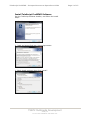
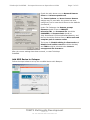
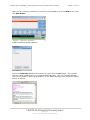
Gateway shortcut. The program window appears:
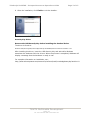
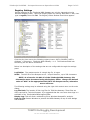
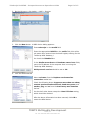
Click on the Settings button to open the settings panel:
NOM Server Config
1. IP: IP address of the ENPS server
2. MOS Port: TCP port to use (10541 is standard)
Local MOS Config
3. MOS ID
4. Listen on all local IP addresses
5. Only listen on IP
6. Connect to server on startu
7. Send roReqAll on Connect
Watched Folder
8. TPRO Remote Folder / 9. Broswe
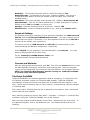
Logging Options
10. Disk File / 11. Status Window
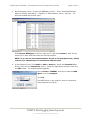
Checking the boxes next to each information type will
log that particular data to the selected log destination.
Disk File logging is required for technical support. The
Status Window log is a good real-time check.
TSWTX Multimedia Development
Austin, TX
Tel: 512 302 0766 Web: www.tswtx.com