1
6.05 Creating Automation Logs
Convert Log to Automation Log
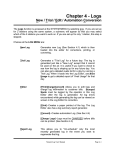
In the Log Editor, click [Convert-Log][Automation Log] in the Log Editor to create a Log in the appropriate
format for the Automation system you selected in Natural Log [Setup] [Station]. See Automation Interfacing
in Chapter 11 for detailed information on specific automation system logs. See next page for discussion of
reconciling NL8 logs with automation play-logs.
q
Select the appropriate automation type.
q
Click [Browse] to tell NL8 where to write the log. NL8 will remember the last path you entered.
q
Certain automation systems need a station number. See Chapter 11 for your specific automation type to
determine what [if anything] needs to go here.
q
Click [Convert] when ready.
q
If errors are encountered, NL8 will allow you to display the automation log errors.
Natural Log User Manual
Page 6-13