1
*gajendra* D:/Thomson_Learning_Projects/Garrigus_163132/z_production/z_3B2_3D_files/Garrigus_163132_ch16.3d, 14/11/08/16:25:58, 16:26, page: 634
634
SONAR 8 Power!: The Co mprehensive Guide
you can set them up to be used within SONAR. To do so, open the file C:\Documents and
Settings\<Username4\Application Data\Cakewalk\SONAR 8 Producer Edition\Cakewalk.ini (in Windows XP) or C:\Users\<Username4\AppData\Roaming\Cakewalk
\SONAR 8 Producer Edition\Cakewalk.ini (in Windows Vista) using Windows Notepad.
Inside that file, you’ll find instructions for how to add new DRMs to the list in the Receive
System Exclusive dialog box.
4.
If you see your device listed, select the appropriate DRM and click OK. The DRM
might ask you for additional information. For instance, if the DRM requests that the
device send the data for a single sound patch, you need to input the patch number you
want it to send. This process is pretty straightforward; you can simply follow the
prompts.
5.
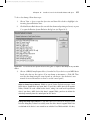
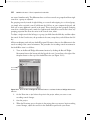
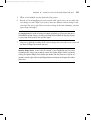
Whichever method you use to initiate the data dump, SONAR ultimately displays the
Sysx Receive dialog box when it’s ready to receive the data (see Figure 16.3). The dialog
box shows the number of bytes of data being received as the dump takes place.
6.
When the count stops, click Done.
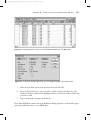
Figure 16.3 The Sysx Receive dialog box displays a count of the System Exclusive data.
Transfer Troubleshooting If the number of bytes stays at zero for more than a few seconds,
most likely something is wrong. Your MIDI device might not be hooked up properly, or
you could have given the wrong answers for the additional DRM questions. Those
answers differ, depending on the MIDI device, so you’ll need to consult its user manual.
In any event, if you have this problem, click Cancel and then check your connections and
try the procedure again.
After the dump is complete, the Sysx view will show the bank you selected with a new name and
length (in bytes).
Changing the Name of a Bank
If you want to change the name of a bank, follow these steps:
1.
Select the bank.
2.
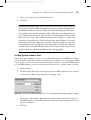
Click the Name button (the one with the lowercase abc on it) or press N to open the
Sysx Bank Name dialog box.