1
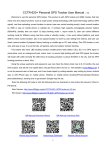
Tracking Platform Operation This platform is designed for CCTR-8XX series GPS Tracker, Language can be selected from the login page : www.999gps.net , every tracker have a unique user name and password, the default user name is the last 7 digital number of the S/N or ID or IMEI, this number is printed on the label that paste on the back of the tracker or under the battery, also user can send SMS (ID*123456 or check#) to tracker to check ID or S/N, the default password is same with user name, user can change password. For example the tracker S/N is : CC0800C01234567, and then the default user name on the platform of this tracker is : 1234567, and the default platform password is :1234567. user can change the password and user information (Such as car plate, phone number ), but can not change the user name, our administrator can change the user name by user request , also if you have several trackers, we can create a fleet user name that can see all your trackers after you logon, ask your dealer to contact us to do this. Note: In the following words, “Click” means click once with mouse left button. Platform Login: Visit www.999gps.net , select the langue version, the login page will display as follow, click the picture or link in the page can visit the proper page to download app or user manual, also scan the QR code with mobile phone can visit: Platform User name User password Click “Login” to login Select Language iPhone App Download Android App Download Wap visit Locate WeChat Locate Manual Download