1
Capstone Turbine Corporation • 21211 Nordhoff Street • Chatsworth • CA 91311 • USA
Capstone Service Network: User’s Manual
The Site Overview Screen
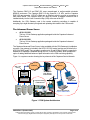
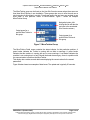
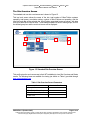
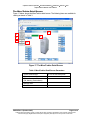
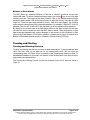
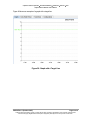
The standard end user site overview screen is shown in Figure 15.
This top level screen shows the name of the site, total number of MicroTurbine systems
operating, total power, cumulative runtime, number of MicroTurbines not operating, and the
local time and date of the selected site. MicroTurbine group data boxes are shown, with data
from up to three MicroTurbines each. To see additional detail for each of these groups, click on
the desired group box and the next level screen will be displayed.
1
6
4
1
5
2
3
Figure 15. Standard Site Overview Screen
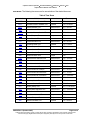
This profile gives the end user access to their MT installation(s) via a Site Overview and Status
screen. The following items are available for viewing (as shown on Table 1) provided through
www.mymicroturbine.com.
Table 1. Site Overview Screen Parameters
1. Systems Up/Down
6. Cumulative Run Time
2. Group Name
3. MicroTurbine Power Output
4. Total Site Power Output
5. Date, Time
400016 Rev. A (October 2007)
Page 21 of 40
Capstone reserves the right to change or modify, without notice, the design, specifications, and/or contents of this document
without incurring any obligation either with respect to equipment previously sold or in the process of construction.