1
4.4 Installing Oil Proof Cover
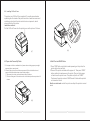
The printer is an Oil Proof Cover supplied. It’s used to prevent water
splashing into the inside of the printer and not oil-water corrosion and
oxidation protection to the internal electronic components, which
extends the life of the printer.
Installation method:
Put the Oil Proof Cover onto the printer cover as the picture4.7 shows.
4.9
4.7
4.5 Paper Jam Caused By Cutter
4.6 Self-Test and DUMP Mode
1. If the paper is thick or sudden lack of power when cutting, paper jam might
appear.(cutter cannot reset)
2. Normally the cutter will reset when repowered, if the cutter did not reset,
users could follow below steps to solve the problem.
① Take away the cutter cover as below picture4.8 shows.
② Stir the cutter gear till the cutter moves to the Initial position as picture4.9
shows.
1. Press "FEED" button and hold on when powering on the printer, the
printer will perform self-test.
2. Power off the printer and take out the paper roll. Then press "FEED"
button and hold on and power on the printer. Then put in the paper
roll and close the printer cover. The printer will print out "DUMP".
That means the printer enters in DUMP mode. All data will be printed
out in raw hex format.
Back to normal mode: restart the printer could put the printer in normal
mode.
4.8
06
07