1
4.7 DIP Switch
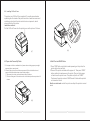
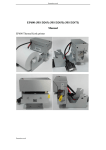
1)Unscrew the screw on bottom of printer and take away the metal cover as
the picture 4.10shows.
2)Users will find the DIP switches under the window as the picture 4.11shows.
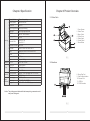
DIP switches could perform printer configurations as follows: COM port baud
rate adjusting, beep alarm switch, printing density adjusting, parity selection
(for serial communication), parallel printing server mode or normal mode
adjusting , EPSON mode or 64character mode switching, Chinese Character
double byte mode or English character single byte mode selection.
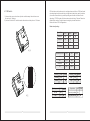
Below are lists of DIP configurations:
Baud rate adjusting:
Baud Rate
DIP1
DIP2
Default
9600bps
OFF
OFF
▲
1920bps
OFF
ON
38400bps
ON
OFF
115200bps
ON
ON
DIP3
DIP4
Default
42
OFF
OFF
▲
48
OFF
ON
Reserved
ON
ON
53
ON
OFF
7
8
Character per line
Beep
4
5
6
DIP
4.10
2
3
4
5
E4
6
6
7
3
JA
ON
8
Disable
ON
Enable
OFF
Density
Default
▲
DIP6
Dark
ON
Light
OFF
Default
▲
4.11
08
1
ON
2
1
DIP5
Printing speed
DIP7
SLOW
ON
FAST
OFF
Default
Byte Mode
DIP8 Default
Double-Byte Mode ON
▲
SingleByte Mode
09
OFF
▲