1
TX10KPS
5.4
Quick reference for PTX-LCD
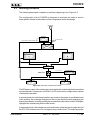
The purpose of this section is to summarize the points that should be adhered to for
using the machines. Should any point not be fully comprehensible, such as how to
operate the machine the first time, the description of the operating system should be
read very carefully on realtive manual.
5.4.1
Using the encoder
The use of the encoder is the same to that one previously described. See chapter
5.2.3.1 for doubts or clarifications.
5.4.2
Operating
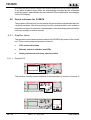
Switch on the exciter with the mains switch on the front panel.
All the STATUS and ALARMS leds are lit on to permit the verification of their good
working status. The display than shows some information regarding the exciter.
After some seconds, the user is invited by the sound of a buzzer and by a message
on the display, to push the encoder if the current settings are not acceptable.
If the use pushes the encoder while the message is displayed, the exciter will start in
stand-by mode, that is completely working but with RF power disabled.
If the encoder is not pushed, the start-up sequence goes on undisturbed.
At start-up, the various modifiable parameters will be set as they were before the
machine was switched off (i.e., 98.00 % MHz and 0 % are just example values): the
current parameters are in fact always stored in non-volatile memory.
When the settings are not correct, for example at the first start up of the machine or if
for some reason it is necessary to change some parameters before starting to transmit,
it is possible to keep the exciter in stand-by mode, as seen above.
22 / 28
Rev. 1.0 - 19/11/02
User Manual