1
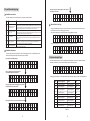
3.5 Load Mode Setting Page
Step ⑤ Long press setting key to save and exit
Setting is successful
Load Mode Introduction
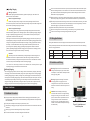
The solar controller has five load work modes,with modes referred as follows:
Code Mode
Description
0
Pure light control
(light on at night, off
during daytime)
When there is no sunlight, the solar panel voltage is below the light control ON
voltage, solar charge controller will open load after delay for a certain time, when
the sunlight appears, solar panel voltage is above light control OFF voltage, solar
charge controller will shut down the load after delay for a certain time
1~14
Light time control for
1~14 hours
When there is no sunlight, the solar panel voltage is below the light control ON
voltage, solar charge controller will open load after delay for a certain time, load
will shut down after working time reaches set value.
15
Manual Mode
16
Debugging Mode
17
Normal Open Mode
L O A D
M O D E
S E T
L i g h t
+
1 7
S E L
Under this mode, the user can control load On and Off through keys, regardless of
daytime or night. This mode is used in some special load situations or used for
debugging.
Used for system debugging, close the load when there is light signal, open load
when there is no light signal, convenient for checking the correctness of the
system installation during installation and debugging.
Power-on load has always maintained output state. This mode is suitable for load
needing 24 hours power supply.
Load Mode Adjustment
The user adjusts load mode according to needs. The debugging mode is set by default (see Load
Mode Introduction). Mode adjustment method goes as follows:
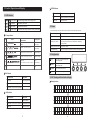
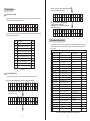
Manual Switch Load Page
The page is available only when load mode is manual mode 15. When load in under manual mode, load
can be turned on and off from following pages manually
Long press the setting key for 2 seconds to turn load on, page displays as follows:
L o a d
T u r n
( H o l d
2
O N
s e c )
Long press the setting key for 2 seconds to turn load off, page displays as follows:
L o a d
T u r n
( H o l d
2
O F F
s e c )
3.6 System Analysis Page
Step ① Enter Load Mode Page
L O A D
M O D E
L i g h t
+
1 6
S E L
Step ② Short press the setting key to
enter mode adjustment interface
L O A D
M O D E
S E T
L i g h t
+
1 6
S E L
Step ③ Long press the setting key for 3 seconds
Load mode will flash at this time
L O A D
M O D E
S E T
L i g h t
+
1 6
S E L
Step ④ Press the +/- key to set needed load mode
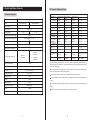
In system analysis page, the user can user charging AH, discharging AH, work days, and system abnormality
information, convenient for user to know the working condition of the whole system.
D i a g n o s t i c s
M e n u s
S E L
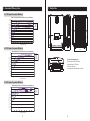
In this page, press setting key to enter system analysis sub menu page, with page contents as following table 3-6
No.
Displaying Items
Notes
Unit
1
Total Charge WH
Total Charge WH
KWH (度)
2
Total Charge AH
Total Charge AH
KAH
3
Total Dischg WH
Total Dischg WH
KWH (度)
4
Total Dischg AH
Total Dischg AH
KAH
5
Total Work Days
Total Work Days
Days
6
Total LVD Times
Total LVD Times
Times
7
Total FUL Times
Total FUL Times
Times
8
L O A D
M O D E
S E T
L i g h t
+
1 7
S E L
15
Error Code
Error Code
Controller temp
Controller temp
Table 3-6
16
℃