1
DMX implementation
DMX implementation
Colour (Channel 1)
DMX
Result
10
White
26
Red
43
Blue
59
Green
75
Yellow
91
Cyan
108
Orange
124
Magenta
140
Neon Green
156
UV blue
173
Pink
189
Aqua
205
Aqua
221
Pink
238
UV blue
254
Neon Green
NB: Intermediate values will give mixed colours
Page 15
Back panel features
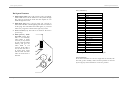
5. Dip switches. Dip switches 1-9 set the DMX channel that
the unit will respond to (in binary code). Channel 1 is the
first valid DMX channel. If all switches 1-9 are off, the unit
will automatically set its own DMX channel. Switch 10 sets
the stand alone ‘group’ of the unit, either 1 (off) or 2 (on).
6. Microphone. The unit can sense the beat of the music
through this built-in microphone.
Note: when power is not connected to the unit, the DMX
input and output connectors are bridged through by a
relay to maintain the DMX circuit.
Page 4