1
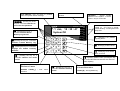
ALARM - alarm in the current
partition
LCD DISPLAY: time and date or partition
name and system status message
TROUBLE - signals trouble
detection in the system - to check
press i key for 3 seconds
cdef - pressing any of the
keys for 3 seconds switches to
one of the four partitions
CA-10 LCD
1 Jan, 12 : 35 : 47
g - pressing the key for 3
System OK
seconds activates Alarm
Memory Log Review
1
2
3
4
5
6
7
8
ALARM
TROUBLE
PARTITION 1
9 10 11 12 13 14 15 16
PARTITION 2
PARTITION 3
h pressing the key for
3 seconds
activates Trouble Memory Log
i - pressing the key for 3 seconds
displays the trouble currently
detected
1
2
3
4
5
6
7
8
9
*
0
#
PARTITION 1, 2, 3, 4
control on - the zone is armed;
control blinking - counting down exit
delay time
PARTITION 4
× - identifying the partition
signaling alarm
Õ - identifying violated zones
Ö - identifying zones where
alarm occurred
j
- pressing the key for 3
seconds switches the chime
on/off
Ø - displaying partition name, pressing the key
for 3 seconds switches between text and zone
state displaing
[*] - pressing the key for 3 seconds
activates Fire Alarm
ACCESS
functions
CODE+[*]
-
user
menu
b
- pressing the key for 3
seconds activates Auxiliary
Alarm
[#]-pressing the key for 3 seconds
activates Panic Alarm
CODE+[#] – arming/disarming