1
!
!!
!
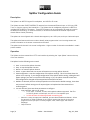
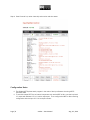
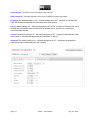
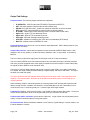
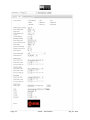
Output Tab Settings
Output interface: The following output interfaces are supported:
•
•
•
•
•
•
•
•
•
•
IP (MPEG2TS): IP/UDP output with RTP/MPEG-TS packets or MPEG-TS
ASI: ASI output interface (requires optional ASI interface card)
HD-SDI: HD or SD SDI output. xCoder can operate as a decoder or format converter
RTP: Native RTP output with SDP file (and smil files for Wowza support)
IP (RTMP): Adobe Flash RTMP streaming format, for Adobe FMS or other CDN.
Apple Live: Apple HTTP live streaming format
Apple VOD : Apple HTTP vod streaming format
Silverlight: Microsoft Silverlight streaming format
ATSC MH : suitable for interfacing with ATSC MH mux/modulators (RTP based)
Multi-TS : multirate version of MPEG2-TS mode
Preferred Network Port: eth0 or eth1 can be used for output data traffic. Eth0 is always used for input
data traffic (for IP modes)
Output video encoder: output video compression format can be either MPEG2 Main Profile, H.264
(baseline, main or high profile), or H.264 Low Latency (baseline, main, or high profile), or low latency
MPEG2.
The Low Latency modes offer single pass, HD-SDI input to ASI or IP output low latency.
The Low Latency MPEG2 and H.264 modes provide a very short delay through the encoder (less than
200 msec), but has somewhat lower video quality compared to the normal mode. For best video quality
the regular H.264 or MPEG2 mode should be used.
There are 6 H.264 Low Delay settings that provide a range of video quality vs low delay performance.
For 720p60 the range of delay with these settings is approximately 100 msec to 800 msec. The higher
the delay, the better the quality.
It is recommended to use GOP settings without B frames for low delay mode. Gop length 60 and I/P
distance 1 are recommended. B frames can be enabled but add latency both in the encoder and a
receiving decoder.
When operating xCoder in transcoding mode, the incoming stream GOP structure will impact the total
latency through xCoder. In addition, the decoder in xCoder adds latency as well. Total latency in this
mode will be in the 1-2 seconds typically for 1-2 second input GOP length streams
H.264 Profile: Baseline , Main and High Profile. High Profile provides the best video quality. Check your
receive device specification to be sure it supports the profile you choose to encode with.
H.264 encoder buffer constraint: typical value is 1000 msec. Longer values can provide better picture
quality, but also increase the latency through the system.
I/P frame distance: Define the distance between I and P frames. Typical setting is 3 (which results in a 2
B frames between P frames)
Page!|!18!
xCoder!–!User!Manual! !!!!!!!!!!!!!!!!!!!!!!!!!!!!!!!!!!!!!!!!!!!Aug!!18!,!2014!