1
!
!!
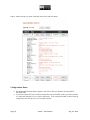
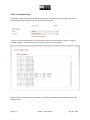
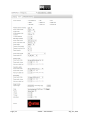
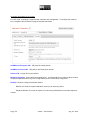
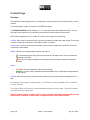
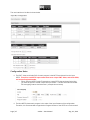
MPEG2TS Streaming Tab Settings
The MPEG2TS Streaming Tab Settings Tab is used for defining output parameters for IP/UDP or ASI
output modes.
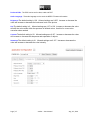
Output resolution preset: Define the output resolution:
•
•
•
Same as input: output resolution will be the same as the input.
Preset values (various): certain typical preset resolutions can be selected, such as NTSC, and
others.
User Override: define a custom resolution
When the output resolution is changed compared to the input, a high quality video scaling algorithm is
used.
Output framerate: Choose the relative frame rate conversion factor:
•
•
•
•
•
•
•
•
•
•
•
Same as input: keep frame rate the same as the input signal frame rate
1/2 of input: reduce the frame rate by a factor of 2 compared to the input frame rate
25 to 29.97: use this setting when converting from PAL to NTSC rate
29.97 to 25: use this setting when converting from NTSC to PAL rate
60 to 50: converts any 60 fps progressive to 50 fps progressive
50 to 60: converts any 50 fps progressive to 60 fps progressive
29.97 to 30: converts any 29.97 fps to 30 fps
30 to 29.97: converts any 29.97 fps to 30 fps
59.94 to 60: converts any 59.94 fps progressive to 60 fps progressive
60 to 59.94: converts any 60 fps progressive to 59.94 fps progressive
2x input: increase the frame rate by factor of 2 compared to the input frame rate. Not available
for input frame rates above 30 fps.
Output video rate: Set to 0 and the video rate will be automatically determined based on a value less
than the defined mux rate paramter. The video rate will be approximately equal to the mux rate minus the
audio rate and other transport elements such as program guide, system clock, etc.
If other than 0 is defined, then video rate will be set to this value, and the mux rate must be a larger value.
If the difference between the mux rate and the video rate is not large enough to provide bandwidth for
other transport stream elements such as audio, program guide, etc., then the video rate will be lowered
automatically to create room for these other elements of the transport stream.
Output mux rate: Define the output mux rate of the MPEG-TS stream (including audio, video, and null
packets)
Output IP Address: set the output IP address for streaming to a specific computer device. Unicast and
Multicast addresses can be used.
Raw Socket mode is available. If this is disabled, then the Linux routing table is used.
Output port: Set to output stream port number
Mulitcast TTL: The time to live parameter of IP routing can be set with this parameter. Typical value to
use is 16.
Page!|!23!
xCoder!–!User!Manual! !!!!!!!!!!!!!!!!!!!!!!!!!!!!!!!!!!!!!!!!!!!Aug!!18!,!2014!