1
Getting Started
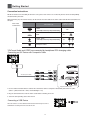
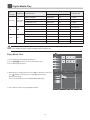
Rear View and Jacks
11
WOOF
7
5
8
1
4
6
10
9
2
7
3
INTERNET
Item
1
AV IN
2
Description
1.MAIN CABL E
Connect the mains cable to the mains socket.
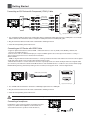
2.HDMI1/2/3/4
HDMI High Definition Multimedia Interfaceprovides an uncompressed, all digital audio
video interface between this TV and any HDMI-device, such as a settop box, bluray disc
player, and A V receiver
3.VGA and AUDIO
Connect to a PC or other devices with a VGA interface.
4.ANT
Connect to the aerial socket on the wall with the RF coaxial cable.
5.OPTICAL
Connect to an external digital audio device.
6.YPBPR and AUDIO
Connect to a DVD player, Digital Set-Top-Box, or other A/V devices with component(YPBPR)
video and audio output jacks.
7.USB1/2
Allows the insertion of a USB storage device to play video, audio, photo and text files and
charging of the 3D glasses via USB cable provided.
8.HEADPHONE
Connect earphones for private listening.
9.AV IN
Connect to the composite video and audio(L/R) output jacks on external video devices.
10.LAN
YouGcanGsetGupGyourGTVGsoGthatGitGcanGaccessGtheGInternetGthroughGyourGlocalGareaGnetworkG
OLANPGusingGaGwiredGorGwireless connectionU
11. WOOF
Connect external bass box.
11