1
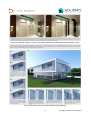
Density Boost (%): density boost will add additional samples to the given Sample Density. There is
a special “artifact” that can show up when there are not enough samples, which is called
“clouds”.
“Clouds” are artifacts that look like uneven shadow/clouds on walls or ceilings which can be
treated with the density boost settings. Higher values will produce more samples to smooth out
these clouds and produce a nice clean image. Recommended starting values are between 50 and
100. Increasing this value has a relatively low impact on render times, except if we use very high
values like 1000 and above (we can type the value we want).
If needed, for avoiding this increase of Density Boost, there is another setting that we can use:
the Adaptive Density value.
Adaptive Density: when rendering interior scenes, adaptive density option should be always
enabled. It adds adaptively samples to the scene based on a contrast threshold (Max Contrast (%)
option that follows) which results in cleaner images without having to use higher Final Gathering
Samples or high Density Boost (%) values. It increases render times (but much less than the other
settings) when rendering interior scenes. It can be used for exterior scenes too but with a
significant render time penalty.
Max Contrast (%): the max contrast (%) is as we said a threshold value for the Adaptive Density
sampling. Based on this threshold number, the Adaptive Density sampling will add more or less
samples to the irradiance cache solution. Lower values of this percentage will add more samples
and higher values will add less. The default 2,000 value is a good starting point and is often
enough for good results with a moderate render time penalty.
Tip: for scenes with difficult light situations (for example a scene with small openings and indirect
light only) a value of 1,000 can often solve the situation without having to increase other settings
for the irradiance cache.
Force Interpolation: this is an acceleration mechanism that should be always enabled. Only in
rare cases when Min/Max Distance (px), Prepass Level and/or Sample Density (%) cannot produce
fine detail samples, leading to discontinuous lines or missing samples on fine details, disabling
this setting is the last option for solving such cases. Disabling this option though will increase
render times significantly.
Prepass Only: this option is by default disabled as it serves to stop the render automatically when
the irradiance precomputation pass has finished. Enable this option when you need to tweak the
GI settings and want to see the GI solution before the final ray tracing. It can help for analyzing
the GI solution when using it in conjunction with Visualize option that follows.
11
Copyright © Solid Iris Technologies