1
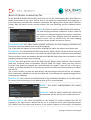
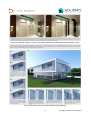
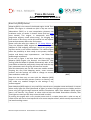
Glossy Depth: this value sets the tracing depth for glossy
materials. The default value of 2 is enough for most cases and
should be left like is. It is also the “Default” value for glossy
material ray tracing and can be overwritten by each material
individually (at the General panel of the Material Lab).
Trace Reflections: enable/disable tracing of reflections.
Trace Refractions: enable/disable tracing of refractions.
Trace Transparencies: enable/disable tracing of transparencies.
Trace Dispersion: enable/disable tracing of dispersion.
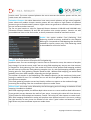
Figure 4: Tracing Depth for
each material
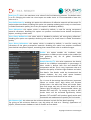
Figure 5: Termination Panel
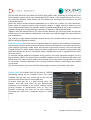
Figure 6: Antialising Panel
Russian Roulette: is an acceleration mechanism for
tracing reflection/refraction based on a brightness
threshold. Should be enabled by default as it helps to
accelerate ray tracing.
Brightness: is the brightness threshold for Russian
Roulette and should be enabled by default.
Min AA Subdivs: sets the minimum subdivision level for
antialiasing (AA) based on the Max Contrast (%) setting.
If the contrast between 2 pixels is below the Max
Contrast (%) value, then the Min AA Subdivs value will
be used. If the contrast between 2 pixels is above the
Max Contrast (%) value, then the Max AA Subdivs value
will be used.
A basic starting point for Min AA Subdivs is 2.
3
Copyright © Solid Iris Technologies