1
English
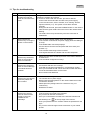
11. Tips for troubleshooting
No.
Questions
Answers
1
What does pairing the
recorder and camera
mean and how does this
work?
Pairing creates the exclusive, encrypted wireless connection
between the recorder and camera.
To connect a camera with the recorder, proceed as follows:
1. Connect the camera and the recorder to the power supply.
2. In the recorder menu, select “Camera”, then “Pairing” and the
required camera (1–4). The system counts down from 60
seconds.
3. During the 60 seconds, press the PAIRING button on the camera
cable until the green LINK LED on the front of the camera starts
flashing.
4. The LINK LED is lit up continuously once the connection is
established.
2
What could be the
reasons why no image is
shown on the monitor?
If you do not have a signal, please check the following:
1. Is the camera connected to the power supply (does the LED light
up red)?
2. Is the HDMI cable connected properly?
3. Are the camera and the recorder paired with each other (see
question 1)?
4. Is the camera within range of the recorder?
5. Is the signal between the camera and recorder disrupted?
3
What could be the
reasons why the device
does not record when
there is movement?
1. Please check that the sensitivity function of the motion detection
is switched on.
2. Is the schedule configured correctly?
4
What could be the
reasons why the device
does not record although
a schedule has been
created?
Possible reasons are:
1. Are the date and time set correctly?
2. Is the SD card locked (Lock/Unlock?), not inserted or empty?
3. Have you formatted the SD card or the external hard disk drive?
It must be formatted before it is first used.
4. No movement was detected.
5
What could be the
reasons why the camera
cannot be paired with
the recorder?
Please check the following:
1. The camera has no power supply.
2. Briefly press the pairing button on the camera while the monitor
counts down from 60.
3. Please press the pairing button for a short time only, not
continuously.
4. Restart the recorder.
7
What could be the
reasons why the live
view can be accessed
via app in the local
network but not
externally?
Please check the following:
1. Is the recorder connected to the network?
2. Do you have an internet connection?
3. Have you connected the recorder to the internet? Please note
the following icon
at the top edge of the monitor.
4. Does your password for the recorder match the password for the
app?
5. Do you have a fast enough internet connection to your mobile
phone?
27