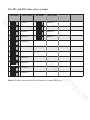
1
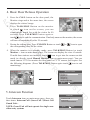
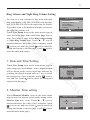
1. Intercom Call: User in one apartment can call
other apartments in the system. the code list will
be created automatically by the system. Touch
D FRGH QXPEHU \RX UHTXLUH RQ WKH VFUHHQ WKHQ
touch LFRQWRGLDO1RWH7RXFK icon again
to redial. 2.The DIP switch codes of each monitor
must be set using the Physical Code Method.)
Intercom Call
AC
[ 00 ]
[ 01 ]
[ 02 ]
[ 03 ]
[ 04 ]
[ 05 ]
Exit
The codes to the
left relate to the
code number
set for each
video monitor
Calling
Next Page
S
ES
C
SE
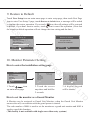
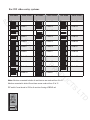
2. Inner Call: If multi slave monitors are installed in the same apartment, select Inner
Call, all the other Monitors will ring at the same time, whichever Monitor answers
the call, the conversation is started and the other monitors will stop ringing at the
VDPHWLPH1RWH7KH',3VZLWFKVHWWLQJVRIDOOPRQLWRUVPXVWEHVDPHPlease
refer to the DIP Switch Settings on page 7 for Logical Code Method)
IT
R
U
C
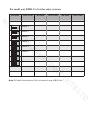
3. Direct Dial Guard unit: A Monitor can be assigned as Guard Unit Monitor; when
the Guard Unit Monitor answers the call, conversation with the guard person is
VWDUWHGThis facility is not available with single zone video entry systems).
6. Basic Setup Instructions
Y
Ring Tone Settings
PR
C
U
D
O
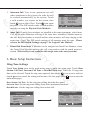
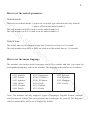
Touch User Setup item on the main menu page to enter the setup page. Touch Door
Station Call Tone, Inercom Call Tone or DoorBell Tone item, There are 12 ring tones
WKDWFDQEHVHOHFWHG7RXFKWKHULQJWRQHUHTXLUHGWKHQWRXFK LFRQWRVDYHDQGH[LW
WRXFK icon to cancel the setting and return to the last page, touch
icon to enter the
main menu page)
TS
Door Station Call Tone : Set the ring tone calling from the door panel.
Intercom Tone : Set the ring tone calling from other apartments/monitors.
DoorBell tone : Set the ring tone calling from a door bell.
Selected:
1 Carmen
2 Ding Dong
3 Rain
4 For Alice
Cancel
06
5 Sonatine
9 Do Re Me
6 Edelweiss
10 Happy Birthday
7 Going Home
11 Jingle Bells
8 Congratulation 12 Telephone Ring
D
Door Station Call Tone ...
Intercom Call Tone ...
DoorBell Tone ...
Clock ...
Next Page
Exit
Home
Door Station Call Tone
LT
User Setup (1)
Home
Save&Exit