1
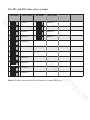
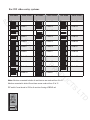
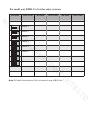
DIP Switch Settings - Physical Code Method
S
ES
C
AC
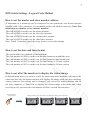
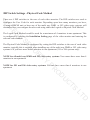
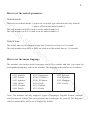
There are 6 DIP switches to the rear of each video monitor. The DIP switches are used to
configure the User Code for each monitor. Depending upon how many monitors you have,
if using a DBC4S unit or have any of the multi way DMR or 592 video entry systems, will
GHWHUPLQHKRZ\RXFRQ¿JXUHWKHXVHUFRGHXVLQJHLWKHUWKH/RJLFDORU3K\VLFDO&RGH0HWKRG
7KH/RJLDO&RGH0HWKRGZRXOGEHXVHGIRUDPD[LPXPRIPRQLWRUVLQRQHDSDUWPHQW7KLV
LVFRQ¿JXUHGE\HQWHULQJWKHInstallation Setting page of the video monitor and entering the
UHOHYDQWFRGHQXPEHUV
SE
R
U
C
7KH3K\VLFDO&RGH0HWKRGLVFRQ¿JXUHGE\VHWWLQJWKH',3VZLWFKHVWRWKHUHDURIHDFKYLGHR
monitor, typically this is required when installing any of the multi way DMR or 592 video entry
systems or if you have more than 4 monitors in one apartment (591 or 596 systems only)
Y
IT
NOTE for all multi way DMR and 592 video entry systems: You cannot have more than 4
monitors in one apartment
TS
C
U
D
O
PR
NOTE for 591 and 596 video entry systems: You can have more than 4 monitors in one
apartment
D
LT