1
7
DIP Switch Settings - Logical Code Method
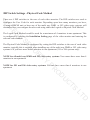
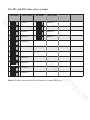
How to set the master and slave monitor address
AC
S
ES
C
$ PD[LPXP RI PRQLWRUV FDQ EH FRQQHFWHG LQ RQH DSDUWPHQW RQHPDVWHU PRQLWRU
together with 3 slave monitors, so you should set the code address correctly. (Note: You
must have one monitor set as a master monitor)
7KHFRGHRILVXVHGWRVHWWKHPDVWHUPRQLWRU
7KHFRGHRILVXVHGWRVHWWKH¿UVWVODYHPRQLWRU
7KHFRGHRILVXVHGWRVHWWKHVHFRQGVODYHPRQLWRU
7KHFRGHRILVXVHGWRVHWWKHWKLUGVODYHPRQLWRU
1RWH7RXFKEXWWRQWRFDQFHOWKHHQWU\WRXFKWRVDYHWKHVHWWLQJV
C
SE
U
How to set the date and time format
Y
IT
R
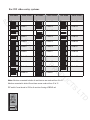
The system offers two methods of date and time
7KHFRGHQXPEHURILVXVHGWRVHWWKHGDWHIRUPDWDVPRQWKGDWH\HDU
7KHFRGHQXPEHURILVXVHGWRVHWWKHGDWHIRUPDWDVGDWHPRQWK\HDU
7KHFRGHQXPEHURILVXVHGWRVHWWKHWLPHIRUPDWDVKRXUV\VWHP
7KHFRGHQXPEHURILVXVHGWRVHWWKHWLPHIRUPDWDVKRXUV\VWHP
O
PR
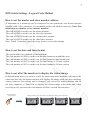
How to set all of the monitors to display the visitor image
D
TS
C
U
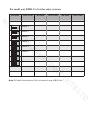
In default mode when you receive a call, the master and slave monitors will ring at the
VDPHWLPHEXWRQO\WKHPDVWHUPRQLWRUZLOOGLVSOD\WKHLPDJHZKLOHWKHVODYHPRQLWRUV
FDQQRWKRZHYHUWKHVHWWLQJVFDQEHFKDQJHG\RXFDQVHWWKHPDVWHUPRQLWRUDQGDOO
the slave monitors to 'Panel On' to display the visitor image at the same time when
UHFHLYLQJDFDOOMXVWHQWHUWKHFRGHQXPEHURIRQHDFKVODYHPRQLWRU
LT
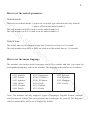
Press call button
on door panel
When reveiving a call, all monitors can display the image at the same time
D
1
1
1
1
2
2
2
2
3
3
3
3
4
4
4
4
Master monitor
#1st slave monitor
#2nd slave monitor
#3rd slave monitor