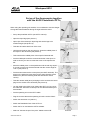
1
Windspeed WS1
Page 5
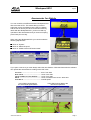
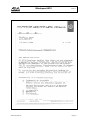
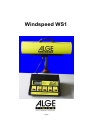
Operating of the Anemometer
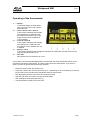
1 ....... Normal
It measures always the wind speed
(every second). This mode is active
before the race.
2 ....... 100 m / 200 m / 75 m / 80 m H
In this mode it measures the average
wind speed over 10 Sekunds. Use
this mode for all sprints of 75 m and
longer (except 100 m Hurdles and
110 m Hurdles).
3 ....... 110 m H / 100 m H
In this mode it measures the average
wind speed over 13 Sekunds. Use
this mode for 100 m Hurdles and 110
m Hurdles.
4 ....... Sprung / <75 m
In this mode it measures the average wind speed over 5 Sekunds. Use this mode for long
jump and all sprints below 75 m.
5 ....... ON / OFF
Device Switch to turn the device on or off.
If you have the anemometer Windspeed WS1 conected with the ALGE Photofinish OPTIc you do
not need to operate the anemometer. The OPTIc does control the anemometer. If you have no
OPTIc you have to operate the anemometer manually.
☞ Switch the anemometer with switch (5) on.
☞ Press at the start of the race the correct key (2 to 4, depending on the race distance). Press the
key at a 200 m race not before the first athlete reach the home stetch.
☞ Now the display shows a count down time (measuring time).
☞ After the end of the count down it shows the wind speed.
☞ After reading the wind speed press key (1).
☞ The anemometer is ready for the next race.
Version:E-99-09-12
Page 5