1
5.6 Voltage/Current/Power adjustment
The output current value is determined by output voltage of power supply and
electronic load’s resistance. Only when the actual current value is lower than the
setting current value, can power supply work in CV mode and the will CV indicator
light be lit.
If output current is higher than the setting value, then power supply will function
in CC mode. And the CC indicator light will be lit.
The output voltage and current value are also influenced by the upper limit of
output power. Take IT6932A(60V/10A/200W) for example, suppose you set the max
power value to be 200W,then when the setting output voltage and current is
25V/10A,in fact, the unit can only output 25V/8A.
5.7 Saving Operation
Customer can save some often-used parameters in nonvolatile memory. You
can use the button
+
Recall
(Save) button or SCPI order *SAV、*RCL to
achieve this function. Saving parameters include: setting voltage/setting current
Saving method:
Press
+ Recall (save) button, and then input the group number you want
to save through number key board. Press enter button to confirm. If you want to
recall the saved parameters, press Recall button and corresponding group
number(number1-9).At last press enter button to confirm.
5.8 Trigger operation
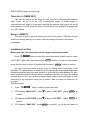
You need to select the trigger mode from the menu before using this function.
After you edit a list file, press
+
Enter
(Trigger)to give a trigger signal.
During the running process, Enter button will be lit all the time.
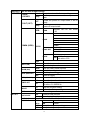
5.9 Menu operation
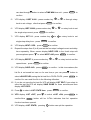
1 Menu description
Press
+
I-set
(Menu) to enter the menu. You will see a optional items on
the screen, through direction keys and rotary knob to upturn VFD display, then the
screen will display the following functions .Press
corresponding items. Press
ESC
Enter
button will enter
button will return to previous menu.
18