1
16) Press On/Off
button to open the output,press
+ Enter (Trigger)to give
a trigger signal.
17) If you have edited several list files,you can select LIST LOAD item to recall the
file you need.And then press
Esc
to quit this operation.Press On/Off
to open the output.Now you only need to press
button
+ Enter (Trigger) to give a
trigger signal,the list file can be ran.
18) In LIST mode,voltage set and current set button can’t be used,In LIST STATE
item,choose LIST>OFF will enable you to quit list mode.
5.10 OVP Function
IT6900A series power supply provide OVP function,press
+ V-set
button
can enable you to set the over voltage protection value.Over voltage may caused
by internal defect or customer’s incorrect operation(such as output voltage rising),or
external voltage too high.Once power supply is protected(OVP),the output will be
off immediately and “OVP” indicator light will be lit,the VFD display “OVER VOLT”。
Avoid external voltage that across the output terminals exceeding the 120% of
rated voltage or it will damage out power supply!
When power supply in OVP state,please check the external factors first, after
you exclude the external factors, press ON/OFF button to open output again.If in
communication state originally, you should by sending order OUTP ON order to
open output.
5.11 Key Lock
Press
+ On/Off (Lock)button to set the key lock state.If keyboard has been
locked,the indicator light LOCK will display on the VFD screen.In addition,when key
board are lock,all butttons can’t be used but ON/OFF 、 Meter buton 、 shift
button.Press this button once again will relieve key lock function.
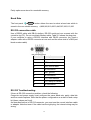
5.12 Rear pins function
-
+
s+
s-
v+ v-
24