1
Dataloy v3.1 - User Manual – Booking and Operations
Booking Cargo – Working with Bookings
•
•
Release 1
16 August 2004
This is a fast input for terms, and not all the different terms available can be used
Valid terms are:
X or SHEX for SHEX terms, example: 12000X or 12000SHEX
C or SHINC for SHINC terms, example: 12000C or 12000SHINC
D or DAYS for total days terms, example: 6D or 6DAYS
H or HRS for total hours, example 20H or 20HRS
Tip: If you don't type anything, SHINC will be used
•
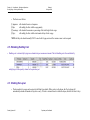
To see the resulting terms used by the system and the days calculated, look at the Cargo Port panel at the lower part of the screen:
For each port, the terms will appear here. As only
SHEX, SHINC etc. can be used when typing in
the terms at the Cargo Details, you must go to
this part of the screen if you for instance want to
change the terms to SHEX UU.
Dataloy Systems AS
–6–
The calculated days for each port is shown here.
Notice that initially the system puts all the
quantity on the first load- and the first discharge
port. If you want to break into different terms for
each port, you must break up the quantity
between each port at this level. Then type the
terms you want for each port.
Proprietary and Confidential