1
Dataloy v3.1 - User Manual – Booking and Operations
Booking Cargo – Working with Bookings
•
Release 1
16 August 2004
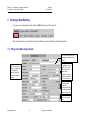
You should break down the commission. This is done by clicking the triple dot next to the commission field and then adding each
individual commission and additional information which is useful for invoicing of the freight later on:
Click on the triple dot next to the
commission field.
Click on the Add button to add a broker and
commission
Enter the name of the broker(s)
Enter the commission %
Check the Credit Charterer checkbox if this
commission should be deducted when invoicing.
Check the C/Oif this broker shall be the adressee
of the invoice.
Check the Basefreight Only checkbox if the
commission should exclude demurrage and
various revenue (freight only).
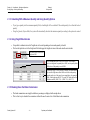
2.1.6 Entering the Loading and Discharging Rates
•
Enter the load and discharging rates as indicated in the above sample
Dataloy Systems AS
–5–
Proprietary and Confidential