1
Dataloy v3.1 - User Manual – Booking and Operations
Booking Cargo – Working with Bookings
Release 1
16 August 2004
2.1.1 Entering Quantity and Freight Rates for Multiple Ports
•
•
If multiple load- and or discharge ports are used on the cargo, the system will put all the quantity on the first load port and the first
discharge port
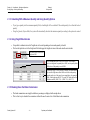
The result of typing the port rotation and entering the freight rate, quantities and terms is as follows (in this case we have added an
additional discharge port (AMSTERDAM/TANANGER-ODDA):
The total quantity is filled out on the first
discharge port.
•
Using this panel you can then break the quantity into each discharge port and also modify the freight rates if you have two different
freight rates for each port:
Split the total quantity
between the two ports.
Enter a different freight
rate for the first
discharge port.
2.1.2 Using a Lumpsum Freight Rate
•
•
The system will automatically recognise any freight rate above 10,000 as a lumpsum
Just type the amount just like you would type any other freight rate
Dataloy Systems AS
–3–
Proprietary and Confidential